
Lesson 1: ZDM Overview & Internals Explained

Ashish Agnihotri
Data Analyst at Exaguru
Introduction
Modern enterprises running mission-critical Oracle Databases cannot afford downtime during migrations. Whether it’s an upgrade (11g → 19c/21c), cloud adoption (OCI/ExaCC), or platform change (Linux, Exadata), the migration strategy must ensure minimal to zero downtime.
Oracle Zero Downtime Migration (ZDM) is an automation tool designed by Oracle for seamless, automated, and low-risk database migrations. It orchestrates end-to-end migration steps—leveraging RMAN, Data Guard, and Oracle GoldenGate (depending on the method)—while providing monitoring, logging, and rollback capabilities.
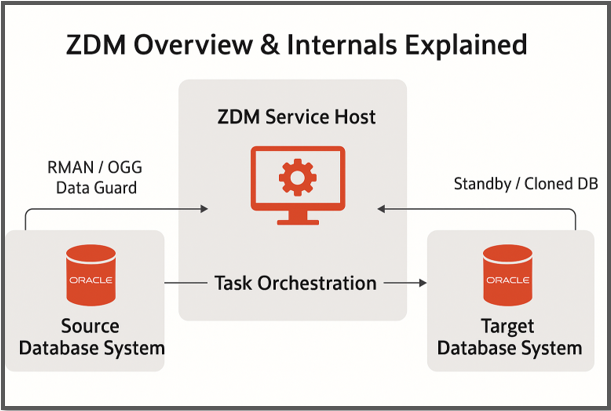
ZDM Technical Architecture
The ZDM architecture can be broken into 3 major layers:
1. ZDM Service Host (Control Node)
- Installed on a dedicated Linux host (separate from source & target).
- Acts as the brain of migration.
- Responsible for:
- Orchestrating migration steps.
- Generating configuration templates.
- Running pre-checks & post-checks.
- Executing migration workflow.
- Runs as
zdmloggerandzdmadmprocesses.
zdmtask framework (handles step-by-step execution & retry logic).2. Source Database System
- Can be:
- On-premises Oracle Database (11gR2 → 19c supported).
- Exadata on-prem.
- VM/BM DB systems on OCI.
- ZDM interacts with the source via:
- SSH connectivity.
- Oracle Wallets for secure passwordless operations.
- RMAN / Data Guard, depending on the migration mode.
3. Target Database System
- Typically:
- Oracle Cloud Infrastructure (OCI) DB systems.
- Exadata Cloud Service / Exadata Cloud@Customer.
- Autonomous Database (in selective migration modes).
- ZDM prepares the target with:
- Matching database home.
- Required patches.
- Network configuration.
- Data Guard broker setup (for physical standby-based migrations).
ZDM Migration Flow (High-Level)
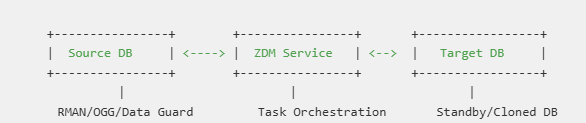
- hePre-cck Phase
- Validates connectivity, environment, and prerequisites.
- Example:
$ zdmcli migrate database -sourcedb <SID> -targetdb <CDB> -precheck
- Stage Phase
- RMAN backup / OGG instantiation / Data Guard standby setup.
- Migration Phase
- Continuous sync between source and target.
- Minimal downtime cutover.
- Cutover Phase
- The source DB stopped.
- The final sync was applied to the target.
- The role switched to primary.
- Post-Migration Phase
- Target verification.
- Source cleanup.
Internal Components Explained
| Component | Role in ZDM |
| zdmadm | Core ZDM engine, manages task orchestration. |
| zdmlogger | Logs each step, maintains rollback checkpoints. |
| zdmtask | Atomic task execution framework (retry, resume). |
| Pre-check Module | Ensures prerequisites (patches, OS settings, DB versions). |
| Transport Layer | Handles RMAN / OGG / Data Guard data transfer. |
| Cutover Module | Executes role transition with downtime < minutes. |
Example: ZDM Pre-check & Migration Commands
Run a Pre-check:
# Run ZDM migration precheck using Data Guard mode
zdmcli migrate database \
-sourcedb myDB \
-targetdb myTargetCDB \
-sourcenode src-host \
-targetnode tgt-host \
-mode dg \
-precheck
Execute Migration (Data Guard mode):
# Run ZDM migration precheck using Data Guard mode
zdmcli migrate database \
-sourcedb myDB \
-targetdb myTargetCDB \
-sourcenode src-host \
-targetnode tgt-host \
-mode dg
Monitor Migration:
zdmcli query job -id <JOB_ID>
Why ZDM?
- Automated end-to-end process (less manual work).
- Supports cross-version and cross-platform migrations.
- Uses native Oracle tools (RMAN, OGG, DG).
- Provides logging, retries, and rollback for safer migrations.
- Ensures near-zero downtime for business-critical databases.
Best Practices
- Always run
-precheckbefore execution. - Keep ZDM Service Host separate from source/target.
- Use Data Guard-based migrations for large DBs.
- For heterogeneous migrations (11g → 19c + endian change), use RMAN/OGG.
- Monitor jobs via ZDM logs (
$ZDM_HOME/logs). - Plan cutover during a low-activity window.
Closing Thoughts
Oracle ZDM is more than a migration utility—it’s an enterprise-grade orchestration engine. Understanding its internals and architecture ensures that architects and DBAs can design robust, low-risk migration strategies for critical workloads, especially when moving to OCI or ExaCC.