01 · Introduction
Deploying Oracle Exadata isn't the same as deploying another database server. This architectural decision dictates your long-term database performance, scalability, availability, networking layout, security posture, backup models, and operational runtime — not just day-one throughput.
Many organizations spend months evaluating hardware specifications but only days preparing the environment that Exadata will operate in. The result: delayed projects, unexpected performance issues, complex migrations, and expensive redesigns that could have been avoided with better planning.
Oracle Exadata delivers its greatest value when the surrounding infrastructure, operational processes, and business requirements are aligned before the first rack is powered on. Let's walk through the eight questions every DBA, architect, and infrastructure team should answer before deploying Oracle Exadata into production.
02 · Question 1: Is Your Workload Actually Suitable for Oracle Exadata?
Exadata is engineered as a highly versatile system for Oracle Database platforms, but maximizing its performance benefits requires a clear understanding of how your business applications interact with its specialized hardware subsystems. It isn't just a fast hardware box — it is an integrated ecosystem that alters how SQL processing occurs.
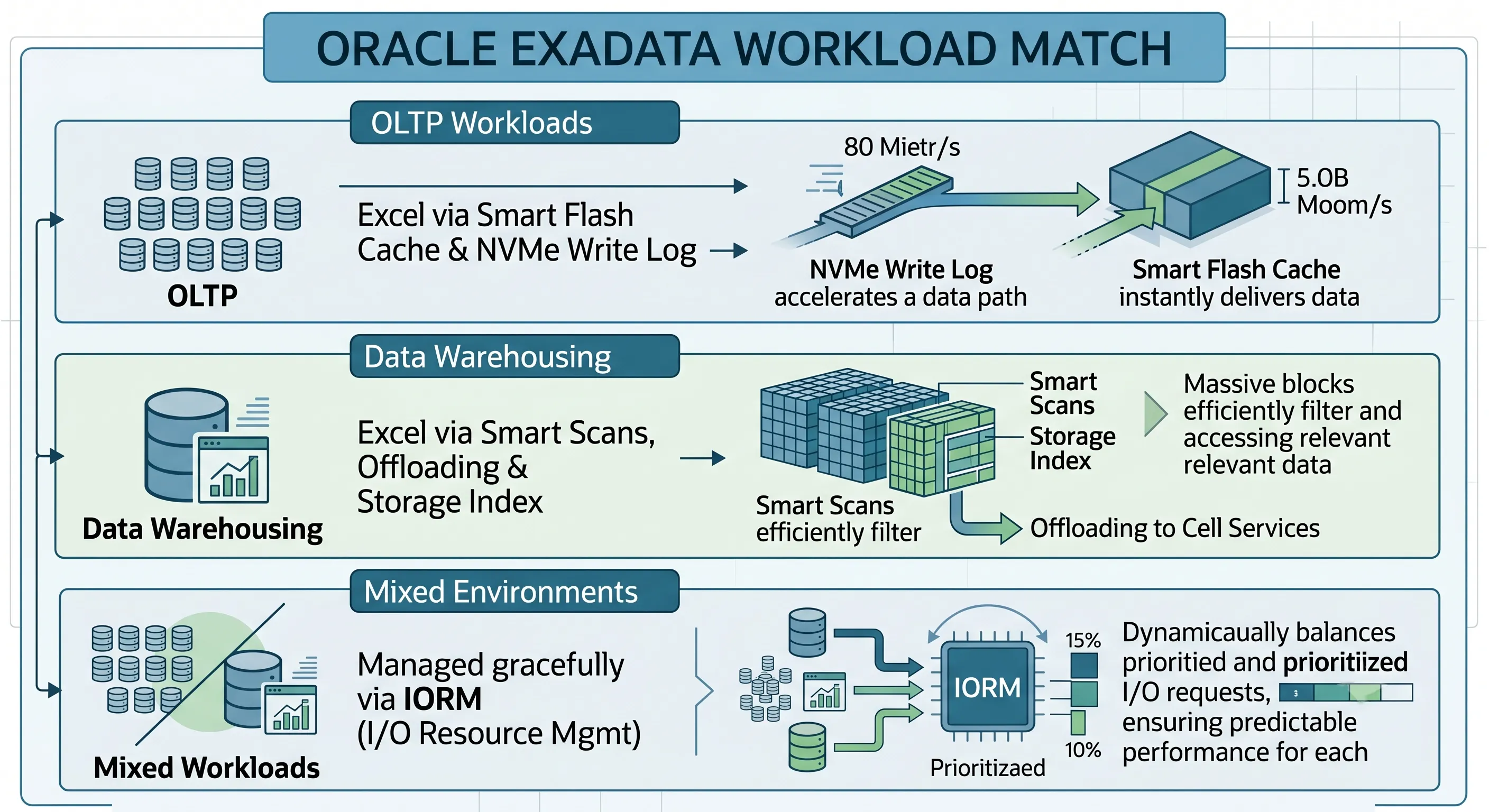
Figure 1 · Exadata workload suitability across OLTP, analytics, and consolidation
OLTP Workloads
Online Transaction Processing (OLTP) environments rely on fast, random, low-latency data reads and writes. Exadata targets this bottleneck by combining dense compute-tier RAM allocations, Exadata Smart Flash Cache, and Exadata Smart Flash Log layers.
- The Mechanism: High-frequency, single-row lookups bypass storage cell physical disks entirely, pulling hot blocks directly from NVMe flash layers or persistent memory (PMEM) with sub-millisecond execution times.
- The Reality Check: If your application experiences heavy application-tier serialization or database row lock contention, Exadata's high-speed storage cannot fix those architectural flaws. Your underlying database schema design must still be systematically optimized for parallel concurrency.
Data Warehousing and Analytics
Data warehouses and Decision Support Systems (DSS) represent the environments where Exadata's underlying engineering truly excels, primarily driven by Smart Scan technology.
- The Mechanism: Instead of streaming massive data blocks across a saturated storage network to the compute tier, Exadata offloads query evaluation — specifically row projection and predicate column filtering — directly to the storage cells. Only the final, strictly filtered result dataset travels back to the compute servers.
- Storage Indexes: Storage cell software maintains memory-resident indexes capturing minimum and maximum column values for physical data blocks. This architecture allows the storage subsystem to skip scanning entire physical disk regions when executing a data scan.
Mixed Workloads and Database Consolidation
Consolidating hundreds of isolated pluggable databases (PDBs) onto a singular Exadata rack drives modern enterprise adoption. However, multi-tenant consolidation introduces the distinct risk of the "noisy neighbor" issue — where a massive, unoptimized reporting query starves an active transaction processing database of critical I/O resources.
- The Solution: Exadata counteracts this problem via the I/O Resource Manager (IORM). IORM works in sync with the Oracle Database Resource Manager to enforce strict I/O allocation rules at the storage tier based on database names, consumer groups, or specific pluggable database (PDB) tags.
Summary of Workload Suitability
| Workload Type | Primary Exadata Feature | Suitability | Pre-Deploy Action |
|---|---|---|---|
| High-Volume OLTP | Smart Flash Cache, Smart Flash Log, PMEM | Excellent | Validate lock contention and app-tier serialization in AWR/ASH |
| Data Warehousing / DSS | Smart Scan, Storage Indexes, HCC | Excellent | Identify Smart Scan candidates via AWR offloading metrics |
| Mixed / Consolidation | IORM + Database Resource Manager | Strong with planning | Define IORM profiles per PDB before go-live |
| Lock-Heavy / Poor Schema Design | N/A — application-layer issue | Fix first | Remediate schema and app design before migration |
03 · Question 2: Have You Sized Compute, Storage, and Flash Capacity Correctly?
Sizing an Oracle Exadata setup based exclusively on current data footprints and baseline CPU metrics regularly creates severe operational bottlenecks. Because Exadata scales via standardized architectural building blocks (Quarter Racks, Half Racks, Full Racks, or tailored Elastic Configurations), correcting a capacity mistake after deployment is both logistically complex and expensive.
CPU Sizing and Memory Planning
Compute node sizing must balance both database processing requirements and Oracle Database licensing constraints.
- The Capacity Trap: Do not size compute nodes based on the average daily utilization of your old infrastructure. Look at peak transaction periods, end-of-month batch processing windows, and seasonal spikes.
- Memory Constraints: Compute node memory is critical for PGA allocations (complex joins and sorts) and the SGA (Buffer Cache, Shared Pool). In consolidated environments, memory is almost always the first resource boundary you hit before running out of CPU cores.
Flash Cache and Storage Growth Scaling
Exadata leverages a tiered storage model. Understanding the ratio of active "hot" data to archival "cold" data dictates whether your application fits comfortably within the high-performance flash layer.
- The Ratio: If your active working set exceeds the aggregate size of the Exadata Smart Flash Cache across your storage cells, your performance profile will drop down to the throughput characteristics of the underlying physical hard drives (in High Capacity configurations).
- Future-Proofing: Factor in a compound annual growth rate (CAGR) of at least 20–30% for corporate datasets. Sizing for today's capacity means you may find yourself requesting budget for an elastic storage expansion node within 12 to 18 months of going live.
Oracle Exadata Deployment Planning Workflow
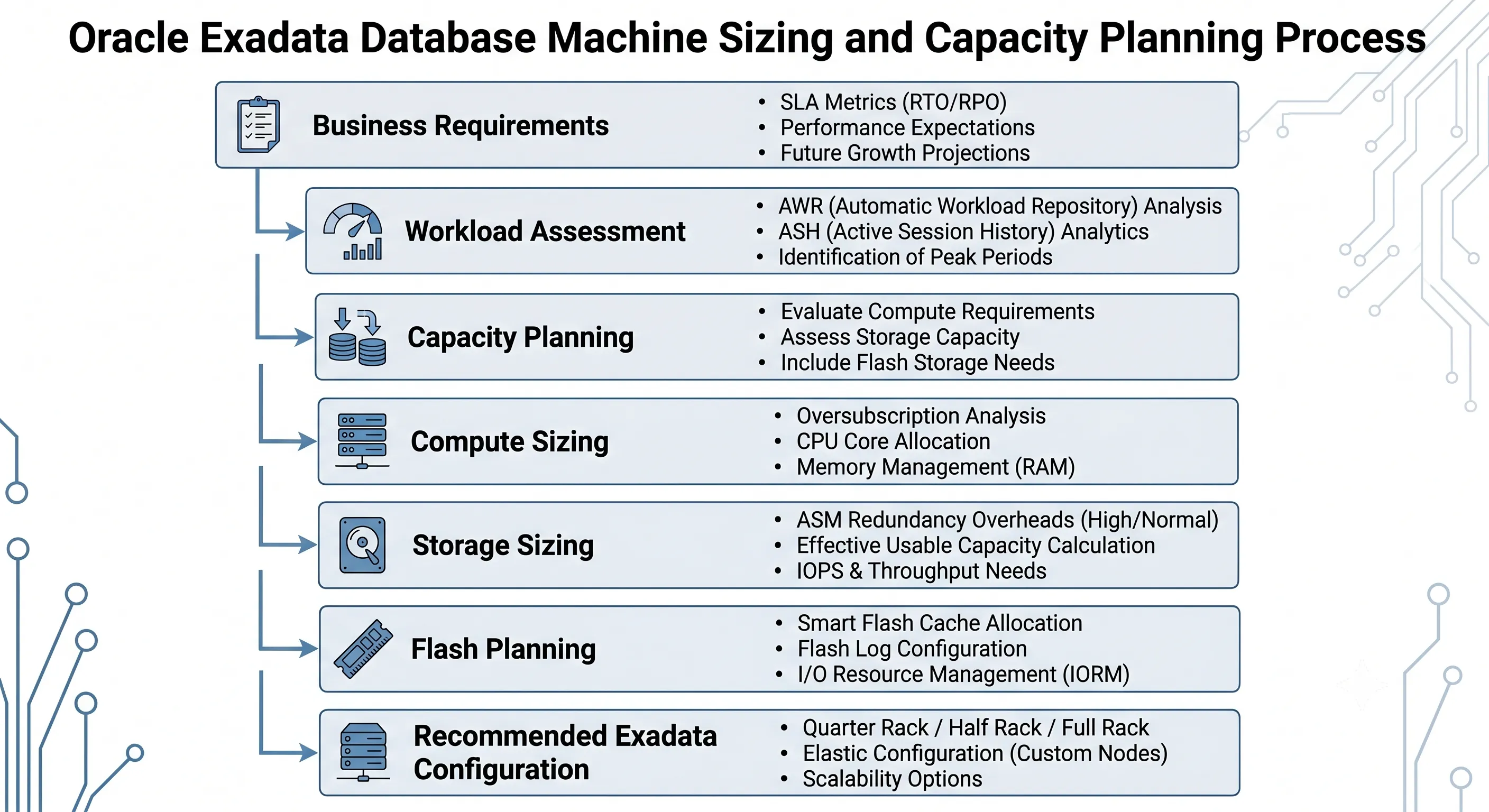
Figure 2 · Exadata deployment planning workflow — from requirements to rack configuration
04 · Question 3: Is Your Networking Architecture Ready?
The overall processing throughput of an Oracle Exadata rack is bound to the architecture of the data center network it hooks into. Internally, Exadata relies on an ultra-low latency fabric powered by RDMA over Converged Ethernet (RoCE) for inter-node clustering traffic and direct storage cell queries. However, moving data cleanly in and out of the rack requires careful planning of external networks.
The Client Network and High Availability Setup
The client network serves as the primary gateway for your business applications to connect to the Oracle RAC instances executing on the compute tier.
- Interface Bonding: Compute nodes feature redundant physical network interfaces that must be bonded using Link Aggregation Control Protocol (LACP) or active-backup profiles to clear single points of failure at the top-of-rack (ToR) switches.
- SCAN and VIP Address Allocation: Ensure your networking team assigns consecutive, static IP addresses for the Single Client Access Name (SCAN) and Virtual IP (VIP) addresses for each compute node. These must be routable within the corporate network and registered correctly inside your corporate DNS server before deployment day.
RoCE Network Isolation and Latency Design
The Exadata RoCE fabric architecture utilizes integrated internal switches operating at 100 Gbps (or higher in recent iterations), handling intra-cluster cache fusion traffic along with storage communications.
- No External Routing: This network must remain strictly isolated. Do not attempt to route corporate application traffic through the internal RoCE switches.
- Switch Configuration: Ensure that data center core switches connecting to Exadata client uplinks are configured with appropriate MTU sizes (typically Jumbo Frames at 9000 MTU are recommended for backup networks, while client networks often remain at 1500 MTU). Misconfigured port speeds or mismatching MTU values will induce silent packet drop anomalies that manifest as sporadic database timeouts.
05 · Question 4: Have You Planned High Availability and Disaster Recovery?
Exadata offers exceptional infrastructure redundancy, but infrastructure resilience is meaningless without corresponding database-level architecture configuration. True High Availability (HA) and Disaster Recovery (DR) must be baked into the design prior to the platform initialization.
Oracle RAC and ASM Architecture Best Practices
Every Exadata deployment relies fundamentally on Oracle Real Application Clusters (RAC) and Automatic Storage Management (ASM).
- ASM Redundancy Selection: You must decide between Normal Redundancy (2-way mirroring) and High Redundancy (3-way mirroring) when creating your ASM disk groups (+DATA and +RECO). High Redundancy is the gold standard for production enterprise environments on Exadata because it allows the system to sustain the simultaneous failure of two storage cells without data loss or downtime. Choosing Normal Redundancy gives you more usable capacity but narrows your safety margins during infrastructure maintenance operations.
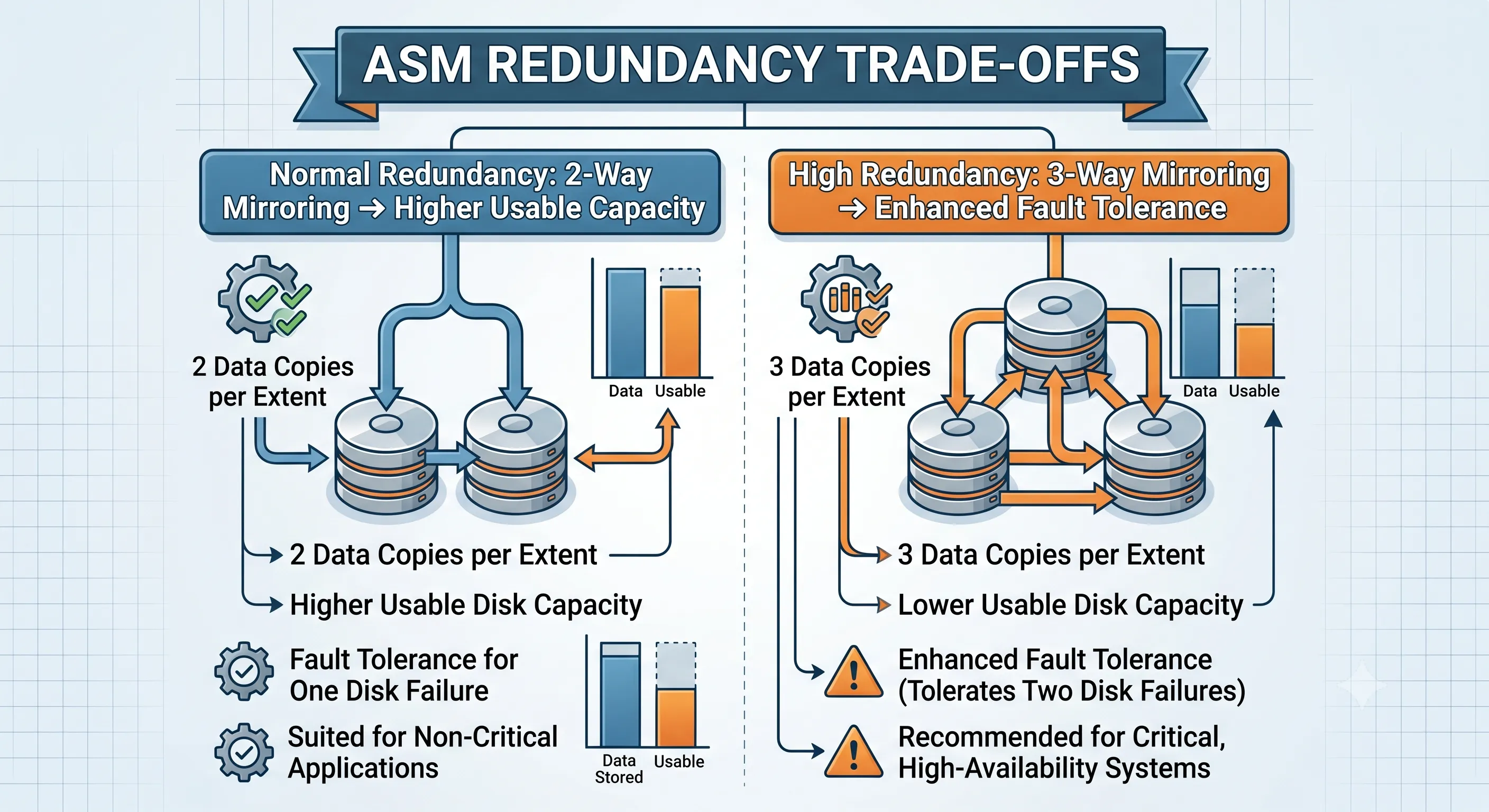
Figure 3 · ASM Normal vs High Redundancy across Exadata storage cells
Disaster Recovery with Oracle Data Guard
Exadata safeguards your operational availability within the local data center, but it cannot protect you against a total data center outage or a regional disaster.
- Active Data Guard Deployment: Deploy a symmetrical Exadata rack at a secondary disaster recovery site running Oracle Active Data Guard. Symmetrical architecture ensures that if a failover occurs, the secondary site has identical compute and storage capacity to handle production workloads without immediate performance degradation.
- Fast-Start Failover (FSFO): Implement an automated broker configuration with an external observer instance to facilitate zero-data-loss, sub-minute failovers when critical outages occur.
06 · Question 5: Is Your Backup and Recovery Strategy Production-Ready?
A common deployment error is assuming that because Exadata executes tasks rapidly, old legacy backup systems will suffice. Running traditional backup agents inside Exadata compute nodes can exhaust CPU cycles, flood the client network, and negate the performance advantages of the system.
RMAN Optimizations and Network Bottlenecks
Recovery Manager (RMAN) backups should be optimized to leverage Exadata's high-speed architecture.
- Dedicated Backup Networks: Never run production backups over the primary client network interface. Exadata compute nodes should be equipped with dedicated 10GbE or 25GbE backup interfaces that route directly to your backup appliance network switches.
- RMAN Channel Configurations: Configure RMAN parallelization channels to align precisely with the number of compute nodes and core availability. Use optimized compression algorithms (such as ZLIB or Advanced Compression options) that minimize CPU utilization while optimizing network transit footprints.
Oracle Exadata Production Architecture
Figure 5 · Oracle Exadata production architecture — client, backup, and DR paths
07 · Question 6: Is Your Security Architecture Ready for Production?
Security should never be an afterthought or treated as a post-installation checklist item. Securing an Exadata environment requires a defense-in-depth approach spanning the database, operating system, network, and storage components.
Transparent Data Encryption (TDE) and Oracle Wallet Management
Protecting data at rest is a foundational production requirement.
- Hardware-Accelerated TDE: Exadata compute nodes utilize Intel/AMD hardware cryptographic acceleration instruction sets to ensure that Transparent Data Encryption (TDE) incurs almost no performance penalty.
- Key Management: Implement a centralized keystore management system, such as Oracle Key Vault (OKV), or establish a highly available, securely backed-up local auto-login Oracle Wallet infrastructure. Ensure that database wallets are isolated from standard root directories and protected with strict OS-level file permissions.
Role Separation and Network Isolation Policies
- Exadata Cell Separation: Implement strict role separation between systems infrastructure administrators, storage cell managers, and database administrators. DBAs should interact with databases via traditional SQL tools; they should not have root access to the underlying storage cells or storage configuration tools (CellCLI).
- Network Access Control Lists (ACLs): Restrict access to the integrated Lights-Out Management (ILOM) interfaces and management switches to secure administrative management subnets.
08 · Question 7: How Will You Monitor Oracle Exadata After Deployment?
Monitoring an engineered system like Exadata requires a toolset that understands the interaction between database execution plans and the hardware layers underneath. Relying on simple OS monitoring tools like top or generic disk alerts will leave you blind to performance issues.
| Tool | Focus Area | Primary Metric Tracked |
|---|---|---|
| ExaWatcher | Real-time OS/Network performance graphs | Inter-node packet tracking and OS scheduler latency |
| CellCLI | Local storage cell metrics & diagnostics | Smart Flash Cache hit ratios and disk structural health |
| Enterprise Manager | Unified full-stack dashboard overview | Holistic infrastructure tracking from app to physical disk |
Proactive Monitoring vs. Reactive Troubleshooting
- ExaWatcher: This built-in, low-overhead utility runs constantly on both compute nodes and storage cells, gathering system performance data across the operating system and network layers. It is your primary forensic tool when evaluating past performance anomalies.
- CellCLI (Cell Command Line Interface): DBAs and storage administrators use CellCLI to monitor cell alert logs, check flash cache hit ratios, and track specific storage wait paths.
- Oracle Enterprise Manager (OEM) Cloud Control: For enterprise oversight, install the specialized Exadata plug-ins within OEM. This delivers a single pane of glass view across compute nodes, storage cells, RoCE network switches, power distribution units (PDUs), and individual databases.
09 · Question 8: Have You Planned for Growth Over the Next Five Years?
An Exadata purchase is a multi-year investment. Sizing for immediate needs without considering future technological transitions and application roadmaps can lead to premature architectural obsolescence.
Designing for Long-Term Scalability and Oracle Database 23ai
- Elastic Expansion Frameworks: Oracle Exadata supports elastic configurations, allowing you to add individual compute nodes or storage cells to your existing rack as resource demands pivot. Ensure your physical data center footprint planning accounts for the appropriate floor space, thermal load dissipation, and power delivery phases required to support a fully expanded rack over time.
- Embracing Oracle Database 23ai: Modern enterprise strategies must incorporate current database capabilities. Oracle Database 23ai introduces advanced enhancements tailored for Exadata platforms, including AI Vector Search offloading capabilities directly to Exadata storage cells. This allows organizations to build large-scale generative AI and vector-based analytics workloads directly against secure production data stores without manual data extract procedures.
Oracle Exadata Production Readiness Architecture
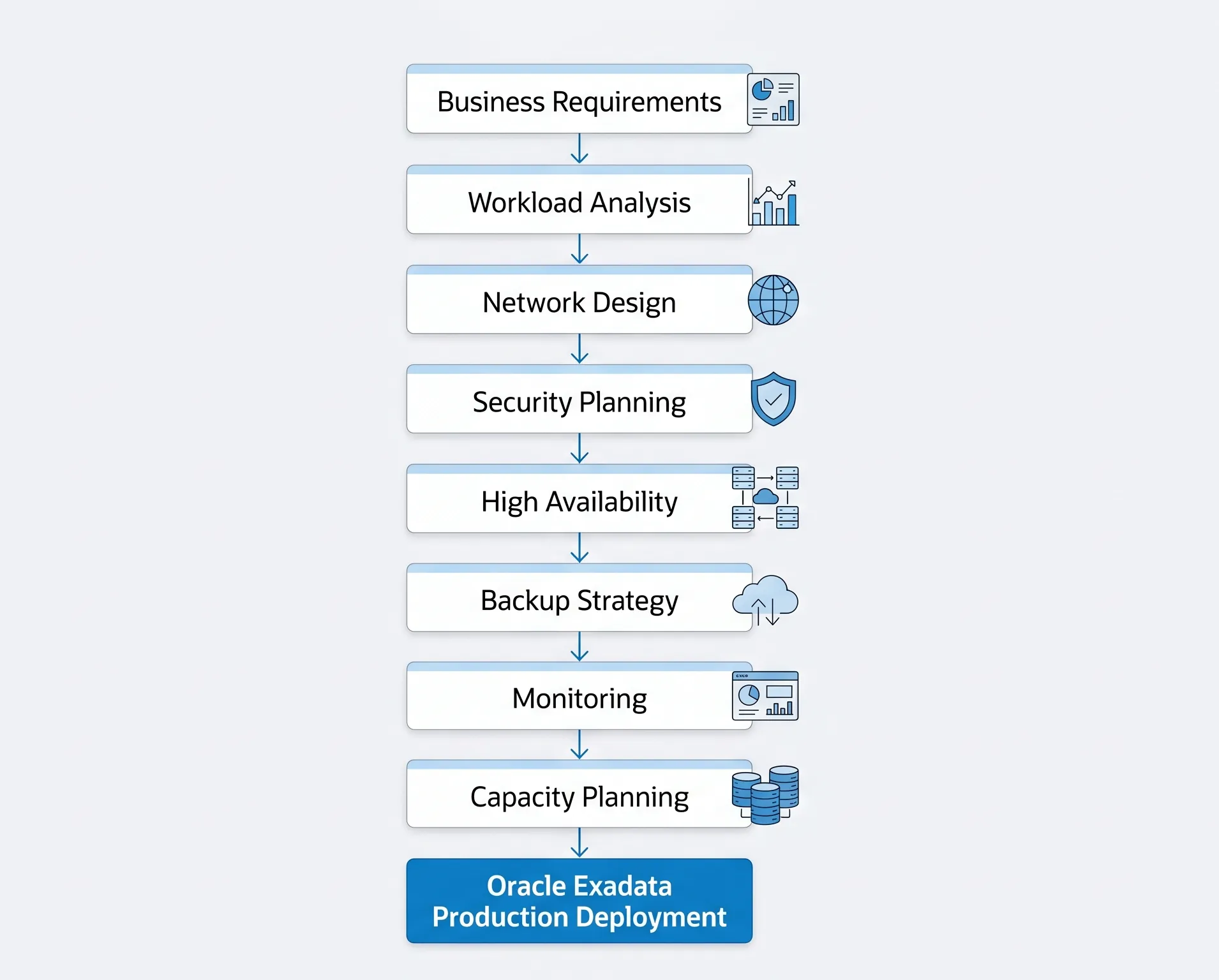
Figure 4 · Exadata production readiness architecture workflow
10 · Common Deployment Mistakes Before Going Live
To help ensure a seamless deployment, let's review common errors encountered during real-world implementations, along with their operational impacts:
- Deploying Exadata Without Prior Workload AnalysisThe Mistake: Migrating legacy databases wholesale without checking for optimal Smart Scan candidates or resolving application lock serialization points. Impact: Poor initial performance returns, leading to a false perception that the hardware platform is underperforming.
- Incorrect Capacity Sizing PlansThe Mistake: Failing to calculate the physical space required for ASM redundancy configurations or ignoring annual enterprise data growth trends. Impact: Storage starvation within the first year, necessitating unexpected and unbudgeted emergency hardware additions.
- Ignoring Network PrerequisitesThe Mistake: Misconfiguring SCAN/VIP DNS settings, routing production workloads over internal RoCE fabrics, or omitting bonded LACP client uplinks. Impact: Intermittent application connection drops, cluster node evictions, and single points of network failure.
- Postponing High Availability Infrastructure DesignThe Mistake: Configuring critical storage areas with Normal Redundancy when business availability goals mandate High Redundancy profiles, or delaying Active Data Guard configurations. Impact: Unintended downtime risks during routine, rolling storage node patching procedures.
- Neglecting Backup Strategy ValidationThe Mistake: Backing up production systems via generic agents over primary application networks instead of leveraging isolated backup VLAN networks. Impact: Heavy production network performance degradation during standard backup maintenance schedules.
- Implementing Security After DeploymentThe Mistake: Deploying databases without activating TDE, neglecting role separation protocols, or failing to establish automated Oracle Wallet rotation routines. Impact: Data compliance audits fail, and post-deployment security retrofits can disrupt live application code.
- Operating Without Proactive Full-Stack Monitoring PlansThe Mistake: Ignoring specialized tools like ExaWatcher and CellCLI in favor of generic host-level operating system monitoring tools. Impact: Missing subtle storage degradation trends, leading to prolonged resolution times during performance triage incidents.
- Planning Exclusively for Present WorkloadsThe Mistake: Designing memory footprints tightly around existing database instances without leaving capacity for new application migrations or upcoming versions like Oracle Database 23ai. Impact: Consolidation project gridlock as compute nodes exhaust available RAM allocations long before CPU limits are reached.
- Failing to Invest in DBA and Infrastructure TrainingThe Mistake: Treating an Exadata rack as a collection of standard Linux boxes and managing it like legacy commodity hardware. Impact: Misconfigured configurations, failure to use Smart Scan enhancements, and prolonged operational cycles.
- Skipping Validation Testing Over Pre-Production PhasesThe Mistake: Skipping end-to-end load testing and failing to perform physical pull-the-plug hardware failure tests before opening systems to production users. Impact: Unidentified bugs or configuration errors manifest during high-volume production events instead of during controlled pre-production cycles.
11 · Production Readiness Checklist
Use this comprehensive checklist to track your preparation before the implementation team arrives to initialize your hardware:
Infrastructure & Physical Space
- Verify the data center floor space matches the physical weight and footprint specifications of the ordered rack configuration.
- Confirm that power distribution units (PDUs) match the electrical phase and plug type configurations specified by Oracle.
- Validate that cooling capabilities can handle the thermal output requirements of the fully loaded rack configuration.
- Perform a structural calculation verifying that transit pathways from the delivery dock to the server room can support the physical transit weight.
Networking Infrastructure
- Allocate static, consecutive IP addresses for Client, VIP, and SCAN interfaces on the appropriate subnets.
- Configure DNS reverse lookups for all assigned hostnames, VIPs, and SCAN addresses.
- Establish bonded LACP profiles across Top-of-Rack client switches to ensure client connection redundancy.
- Isolate the internal RoCE fabric network to ensure no external corporate data traffic routes through it.
- Set up a dedicated backup network interface on a separate physical VLAN with appropriate Jumbo Frames (9000 MTU) enabled.
Database Architecture & High Availability
- Perform an upfront Automatic Workload Repository (AWR) analysis to identify high-priority Smart Scan candidates.
- Decide on the ASM disk group structure and choose High Redundancy (3-way mirroring) for critical production environments.
- Formulate a detailed Oracle RAC node allocation matrix for consolidated database environments.
- Build a symmetrical Data Guard/Active Data Guard architecture model at a separate physical disaster recovery site.
Security Implementation
- Activate Transparent Data Encryption (TDE) from day one utilizing hardware-accelerated instruction sets.
- Establish an isolated, auto-login Oracle Wallet or configure connection paths to a centralized Oracle Key Vault.
- Enforce administrative role separation by limiting root access to storage nodes via CellCLI.
- Restrict ILOM management interface access to dedicated administrative subnets.
Backup & Recovery Management
- Dedicate isolated RMAN communication networks separate from the core client network.
- Build and test specific RMAN parallel backup channel scripts across the compute node framework.
- Verify that external backup targets (such as ZDLRA or All-Flash arrays) can handle peak backup ingest rates.
- Formally document and validate your Recovery Point Objective (RPO) and Recovery Time Objective (RTO) metrics.
Full-Stack Monitoring
- Confirm that ExaWatcher services are active and scheduled to collect data on all local nodes.
- Integrate the official Exadata plug-in modules into Oracle Enterprise Manager Cloud Control.
- Configure automated email and page alerts for hardware failures, threshold breaches, and storage cell warnings.
12 · Frequently Asked Questions
1. Can we use our existing corporate fiber switches to manage internal Exadata communications?
No. The internal RoCE (or InfiniBand) fabric of an Oracle Exadata rack is a self-contained ecosystem. It utilizes high-speed internal switches integrated inside the physical rack frame. These internal switches handle intra-node communication and storage traffic, and must remain completely isolated from your external corporate network fabric.
2. What is the practical performance difference between ASM Normal Redundancy and High Redundancy on Exadata?
ASM Normal Redundancy uses two-way mirroring, which yields higher usable storage capacity but leaves you vulnerable if multiple components fail simultaneously. High Redundancy implements three-way mirroring across distinct storage cells. High Redundancy is strongly recommended for production environments because it allows the storage tier to maintain full availability even during the concurrent loss or maintenance of two storage cells.
3. Does activating Transparent Data Encryption (TDE) cause noticeable performance drops on Exadata?
No. Exadata compute nodes utilize built-in cryptographic acceleration instructions inside the processors. This architecture handles encryption and decryption processes at the hardware layer, allowing you to secure your production data at rest with negligible CPU overhead.
4. How does Exadata Smart Scan optimize performance compared to a standard enterprise storage array?
In a standard storage model, the database server must pull entire data files over a storage network to filter rows and columns locally. Exadata Smart Scan reverses this paradigm. It passes the query's WHERE clause down to the storage cells, which filter the data directly at the disk layer. The storage cells return only the precise rows and columns requested, drastically reducing storage network traffic and freeing up compute-tier CPU cycles.
5. Why shouldn't we run traditional third-party backup agents inside Exadata compute nodes?
Traditional backup agents often introduce heavy, unoptimized CPU overhead and rely on non-bonded network paths. Running them inside compute nodes can cause node evictions and slow down production database performance. The recommended approach is to use Oracle's native RMAN utility routed over a dedicated, isolated backup network fabric.
6. Can we run a mixed workload of OLTP and large Data Warehouse apps on the same Exadata rack?
Yes. This is one of Exadata's core strengths. By leveraging Exadata I/O Resource Manager (IORM) combined with Oracle Database Resource Manager, you can define clear resource profiles. This ensures that high-priority OLTP transactions receive low-latency flash priority, while large data warehouse queries are throttled so they don't impact transaction processing performance.
7. What is the role of ExaWatcher, and how does it differ from Oracle Enterprise Manager?
ExaWatcher is a lightweight diagnostic utility that runs directly on Exadata nodes and storage cells. It continuously captures low-level operating system and network metrics, making it an excellent tool for post-incident root-cause analysis. Oracle Enterprise Manager Cloud Control provides a broad, unified graphical interface for real-time monitoring, alerts, and overall lifecycle management across your full enterprise infrastructure stack.
8. How does Oracle Database 23ai benefit new deployments on Exadata?
Oracle Database 23ai introduces deep feature integrations designed specifically for Exadata's architecture. A key highlight is the offloading of AI Vector Search operations directly to Exadata storage cells. This allows you to run high-performance vector queries for LLMs and generative AI workloads right alongside your core transactional data, delivering exceptional speed and scalability without moving your data.
13 · The Short Version — 8 Questions Every Exadata Team Should Answer Before Going Live
- Have you confirmed that your workload will truly benefit from Oracle Exadata's engineered architecture?Validate OLTP, DW, and consolidation fit against Smart Scan, flash, and IORM capabilities before migration.
- Have you accurately planned compute resources, storage capacity, Flash Cache, and future growth?Size for peak load and 20–30% CAGR, not average daily utilization.
- Is your networking infrastructure — including RoCE, IP addressing, and client connectivity — fully prepared?Bond client uplinks, register SCAN/VIP DNS, and isolate the internal RoCE fabric.
- Have you designed High Availability using Oracle RAC, ASM, and Disaster Recovery with Data Guard?Choose High Redundancy for production and deploy symmetrical Active Data Guard at a DR site.
- Is your backup and recovery strategy tested, documented, and capable of meeting business recovery objectives?Route RMAN over dedicated backup networks — never over the client VLAN.
- Have you implemented production-ready security with TDE, auditing, Oracle Wallet, and proper access controls?Activate TDE day one, enforce CellCLI role separation, and lock down ILOM access.
- Do you have proactive monitoring in place using ExaWatcher, AWR, Enterprise Manager, and health checks?Generic OS tools alone will miss storage-layer degradation on an engineered system.
- Have you planned for business growth, additional workloads, and long-term scalability rather than only today's deployment?Reserve floor space, power, and capacity for elastic expansion and Oracle Database 23ai workloads.
The success of an Oracle Exadata deployment isn't determined on installation day — it's determined by the planning that happens weeks or even months beforehand. Teams that ask the right questions before deployment spend less time troubleshooting later and more time benefiting from the platform's full performance, availability, and scalability.
Before installing Oracle Exadata, test one assumption: is your environment actually ready for it? At ExaGuru, our Exadata Expert course covers production deployment planning, IORM, Smart Scan tuning, and migration runbooks — because the rack is only as good as the architecture around it.