01 · Introduction
At first glance, Oracle Exadata looks like a powerful rack — servers, storage, networking, and Oracle Database software stacked together. That is exactly why so many buyers file it under "database appliance" and compare it to other high-end database platforms.
Oracle never designed Exadata to be just hardware. It was built as a complete database platform where every component — Compute Nodes, Storage Cells, networking, Flash Cache, and Oracle Database — is tuned to work as one system.
That is the real difference. Traditional appliances bolt hardware and software together. Exadata integrates them so tightly that storage participates in SQL execution, networking cuts CPU overhead, and Oracle Database itself is optimized for the infrastructure underneath it.
02 · What Is an Engineered System?
Understanding Exadata's impact requires looking at the core design philosophy that separates an Engineered System from a conventional hardware appliance.
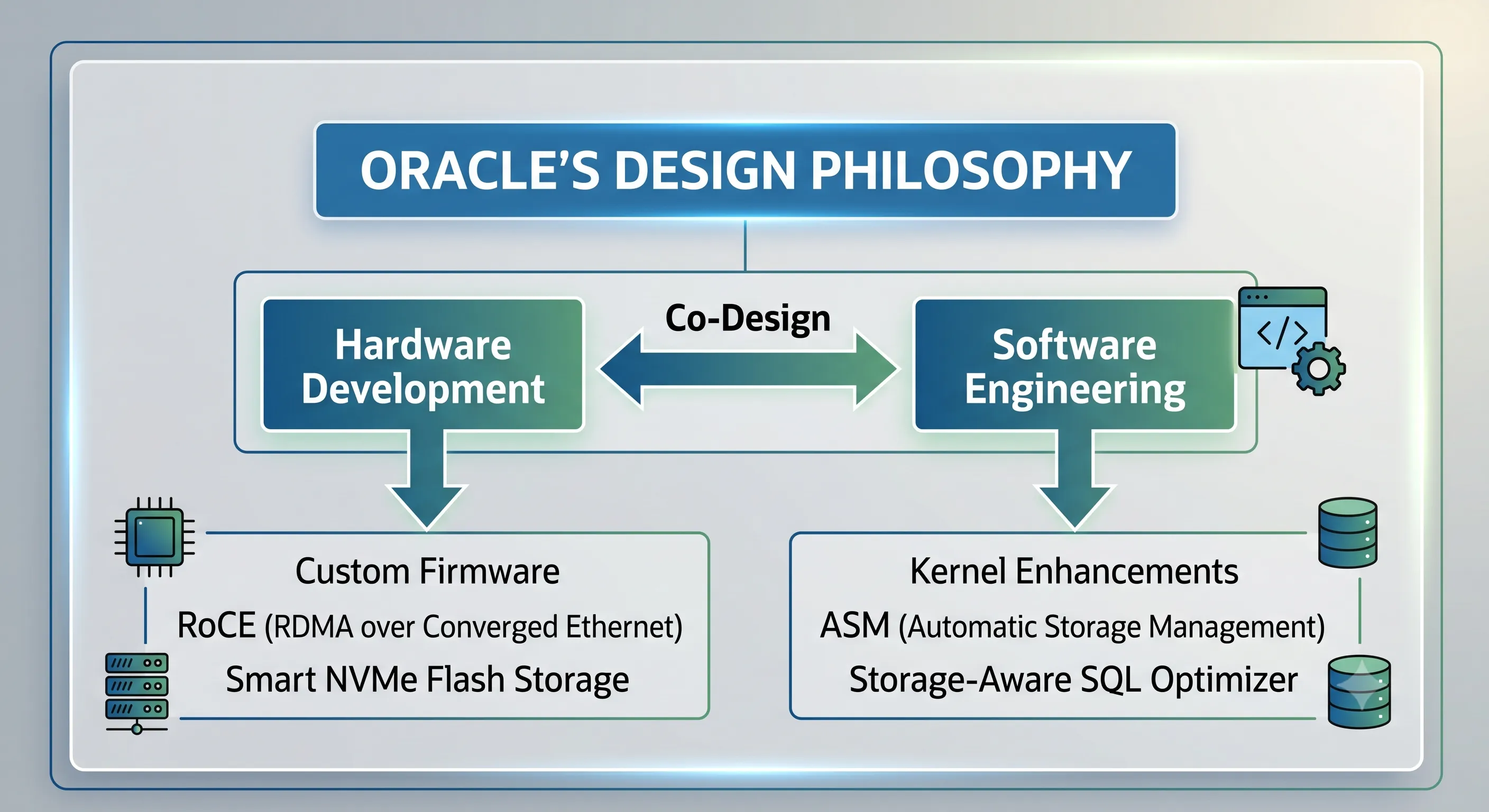
Figure 1 · Oracle's co-design philosophy for Exadata Engineered Systems
Definition of an Engineered System
Oracle's Design Philosophy
Oracle's engineering principle for Exadata is straightforward: eliminate data movement, maximize architectural parallelism, and automate full-stack management. Instead of treating infrastructure as a passive landing zone for compiled code, Oracle engineers rewrite the database kernel alongside server firmware.
When a DBA issues an operation, it can bypass traditional OS-level bottlenecks and use purpose-built execution paths inside the silicon and networking fabric.
The Crucial Difference: Integration vs. Engineering
The industry often treats "integrated" and "engineered" as synonyms. They are not.
Integrated Appliances — The Kit Car
A vendor bolts commodity parts together — chassis from one source, engine from another, brakes from a third — and wraps it in a single brand. It works. But the pieces were never drawn on the same blueprint.
Engineered Systems — Formula 1
Every curve of the chassis, every line of transmission firmware, and every tire compound is co-designed by one team for one objective. Exadata follows that model — not the kit-car model.
Because Exadata is an Engineered System, it removes the friction where database block requests become generic OS calls, then standard network packets, then unoptimized storage array controller work.
03 · Why Isn't Exadata Just Another Database Appliance?
To see why Exadata stands apart, compare its internals to a standard commodity database appliance.
Traditional Database Appliances
Most traditional systems rely on a rigid, decoupled stack:
- Commodity Compute Nodes: Standard x86 servers on Linux or Windows. The OS schedules processes the same way whether it is DBWR or a background daemon.
- Generic Storage Arrays: Block-level SANs that see LUNs and LBAs — not Oracle data blocks, index segments, or redo logs.
- Standard Networking: TCP/IP or Fibre Channel with heavy CPU interrupt overhead on every packet.
- Independent Software Execution: The database runs SQL in its own memory and asks the OS to fetch raw blocks whenever data is needed.
Oracle Exadata's Purpose-Built Stack
Exadata replaces that fractured design with a uniform architecture optimized for Oracle Database workloads.
- Compute Nodes (Database Servers)Run Oracle Linux with the Unbreakable Enterprise Kernel (UEK), tuned for huge pages, Oracle background process scheduling, and optimized IPC.
- Storage Cells (Exadata Storage Servers)Intelligent Linux servers running cellsrv. They understand Oracle block formats, tablespaces, and Hybrid Columnar Compression — and actively participate in query processing.
- RoCE Networking (100 Gbps)Remote Direct Memory Access over Converged Ethernet lets Compute Nodes read or write Storage Cell memory directly — bypassing the OS kernel and dropping latency to sub-millisecond levels.
- Smart Scan and Cell OffloadingPredicates and column projections are pushed to Storage Cells. Cells filter locally and return only matching rows and columns — not millions of full blocks.
- Smart Flash CacheNVMe flash that understands Oracle object types. It caches data blocks, index blocks, and undo segments while bypassing sequential scans that would flush useful data.
Where a traditional appliance treats each layer as an isolated block-level entity, Exadata creates an end-to-end path where database logic flows down into the deepest storage layers.
04 · What Makes Oracle Storage Cells Intelligent?
The architectural magic of Exadata lives inside the Storage Cells. To understand why they outperform standard storage arrays, look at the software running on every cell.
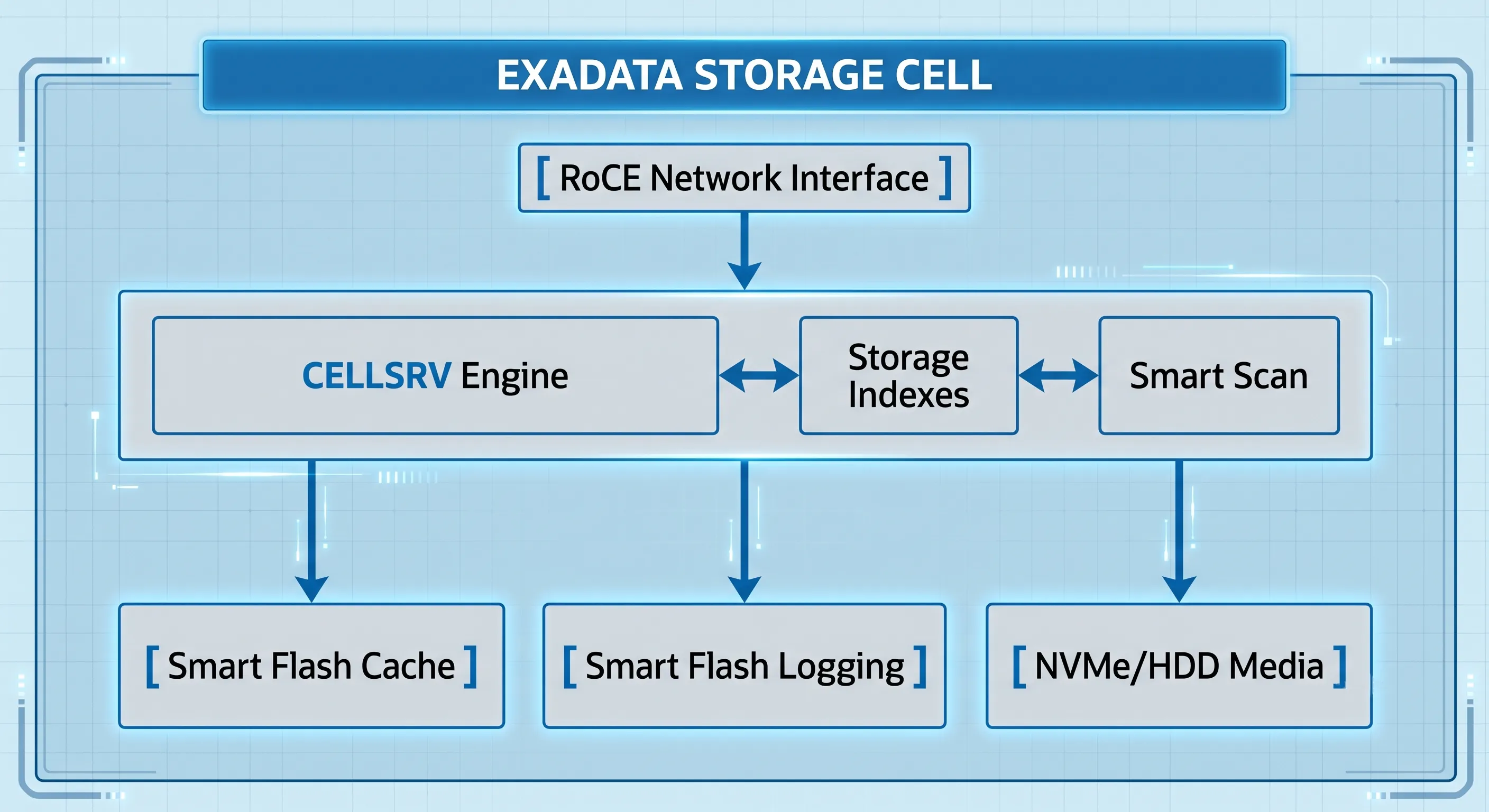
Figure 2 · Exadata Storage Cell internal architecture
The Storage Cell Architecture
Every Exadata Storage Cell runs three primary software processes:
- cellsrv (Cell Server): Handles I/O and executes offloaded SQL predicates from database nodes. Multithreaded and built to use cell CPU cores for parallel data processing.
- ms (Management Server): Provides management, configuration, and monitoring interfaces.
- rs (Restart Server): Monitors cellsrv and ms, restarting them automatically on failure.
Smart Scan and Cell Offloading
When a query qualifies for Smart Scan, the Cost-Based Optimizer (CBO) changes the execution path. Instead of standard block read calls, it sends a specialized query description to storage cells over RoCE.
The cellsrv process reads blocks from media or flash cache, verifies checksums, and filters on the fly:
- Row Filtering: 500 million rows, 12 match
WHERE region = 'EAST'— the cell discards the rest before anything hits the network. - Column Projection: 150 columns in the table, 2 in the SELECT — the cell strips the other 148 from the data stream.
The network carries only a tiny fraction of relevant data. That is how Exadata cuts transfer bottlenecks by orders of magnitude.
Storage Indexes
age is 42, a query for WHERE age > 65 skips that entire region — no physical read required.
Smart Flash Cache & Smart Flash Logging
Smart Flash Cache keeps hot data blocks instantly available. Because it understands Oracle metadata, it stops batch jobs from polluting the cache. Write-Back mode writes directly to NVMe flash and returns immediate confirmation while destaging to disk asynchronously.
Smart Flash Logging tackles REDO write latency — one of the most critical OLTP metrics. REDO entries write to both disk controllers and NVMe flash simultaneously. Whichever completes first returns success to the database server, eliminating latency spikes from I/O queuing.
Production Example: Financial Aggregate Query
| Architectural Metric | Traditional Tier-1 SAN | Oracle Exadata Engineered System |
|---|---|---|
| Data Movement Path | Moves all 4 TB of raw blocks across SAN switches into host RAM. | Moves only a few KB of filtered, pre-aggregated results. |
| Resource Bottlenecks | Saturates storage fabric; spikes host memory bus and CPU. | Fabric stays clear; compute nodes remain free for OLTP. |
| Execution Mechanism | Passive block requests (Read Block X). |
SQL offloading via Smart Scan and Storage Index pruning. |
Table 1 · 4 TB financial aggregate query — traditional SAN vs Exadata
05 · How Does Oracle Optimize the Entire Technology Stack?
Exadata's efficiency comes from vertical optimization across every layer. If any single layer stayed generic, the chain would break.
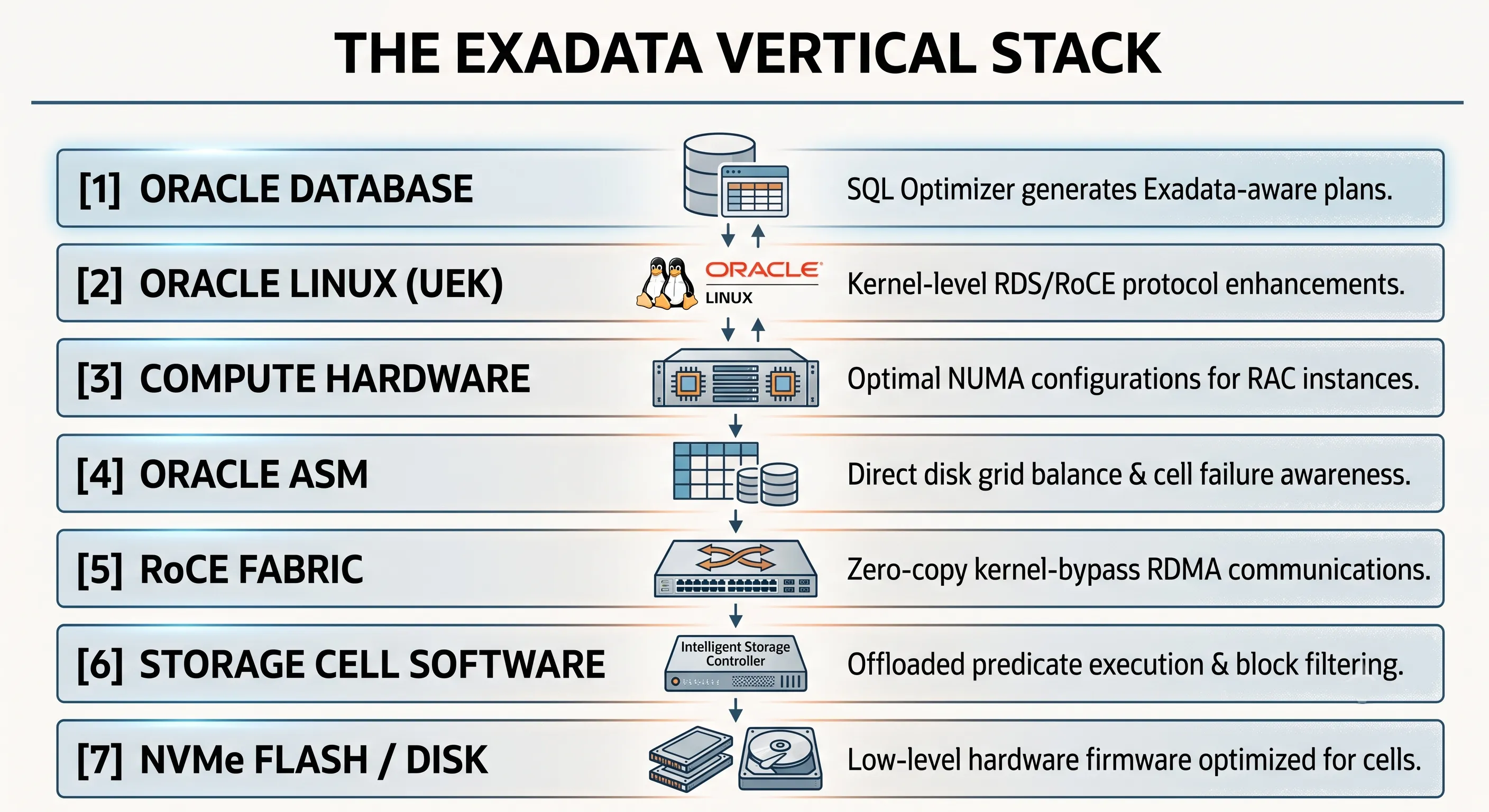
Figure 3 · Full stack optimization across seven Exadata layers
- Oracle Database LayerThe engine knows it runs on Exadata. The CBO adjusts cost calculations for cheaper offloaded scans. Hybrid Columnar Compression (HCC) packs data efficiently while remaining natively readable by storage cells.
- Oracle Linux Kernel (UEK)Native Reliable Datagram Sockets (RDS) over RoCE. Virtual memory tuned for massive SGA footprints without page table penalties.
- Compute Node HardwareMemory channels, CPU cores, and PCIe lanes configured so NICs communicate directly with local NUMA sockets — minimizing socket-to-socket bus traffic.
- Oracle ASMUnderstands Storage Cells natively. Distributes data with allocation units aligned to cell read boundaries. Rebalancing coordinates with cellsrv so production workloads beat resilvering.
- RoCE Network Fabric100 Gbps links with Priority Flow Control (PFC) and Explicit Congestion Notification (ECN) for zero-packet-loss database synchronization — even under heavy DW traffic.
- Storage Cell Software (cellsrv)Monitors flash health, runs media scrub checks, and prioritizes critical I/O (redo, control files) over batch scans.
- Firmware and Physical HardwareDrive controller firmware tuned for mixed I/O — sequential reads do not starve random OLTP single-block reads.
06 · Why Does Exadata Perform Better Than Generic Infrastructure?
The core advantage comes down to a simple law of computing: moving code to data beats moving data to code.
The Mechanics of Speed
Generic systems pull blocks from storage, through a controller cache, across a network adapter, through the OS kernel, and into database memory before any processing happens. Every transition is a bottleneck.
Exadata flips that model:
- Reduced Data Movement: Predicate offloading drops data movement by 10x–100x depending on query type.
- RDMA-Powered Low Latency: RoCE lets compute nodes read remote cell memory directly — single-digit microseconds, close to local RAM.
- Workload-Aware Flash: Smart Flash Cache pins active transactional indexes in flash while letting temporary dump operations go to cheaper tiers.
Step-by-Step SQL Execution Walkthrough
- Application Tier: Enterprise app submits a complex analytical SQL to a Compute Node.
- SQL Parsing and Optimization: CBO recognizes Exadata and generates a plan using
TABLE ACCESS STORAGE FULLinstead of a standard full table scan. - Instruction Generation: Compute Node builds Smart Scan descriptors with predicates and column projections.
- RDMA Over RoCE: Instructions travel over 100 Gbps RoCE, bypassing OS networking layers.
- Storage Index Pruning: cellsrv skips 1MB regions whose min/max boundaries guarantee no matches.
- Smart Flash Cache: Remaining regions read from NVMe flash at line speed, or fetched from underlying media.
- Cell Offloading: Cell CPUs filter rows and prune columns locally.
- Result Return: A condensed payload returns over RoCE — minimal processing before the app sees results.
07 · Why Can't Traditional Infrastructure Replicate Exadata?
Enterprise IT teams often try to build their own Exadata alternative — fast x86 servers, NVMe-oF all-flash SANs, standard Oracle Database on top. Despite significant spend, these DIY stacks consistently fall short.
The Vendor Disconnect
Custom architectures integrate components from separate vendors. The flash vendor optimizes firmware for generic OS workloads — not Oracle's database kernel or RAC internals. Their arrays cannot implement Smart Scan. They always return entire blocks over the wire.
The SAN Bottleneck
Even with NVMe-oF, block protocols restrict communication to Read Block X or Write Block Y. Evaluating a billion rows across a million blocks means every block travels to the database host.
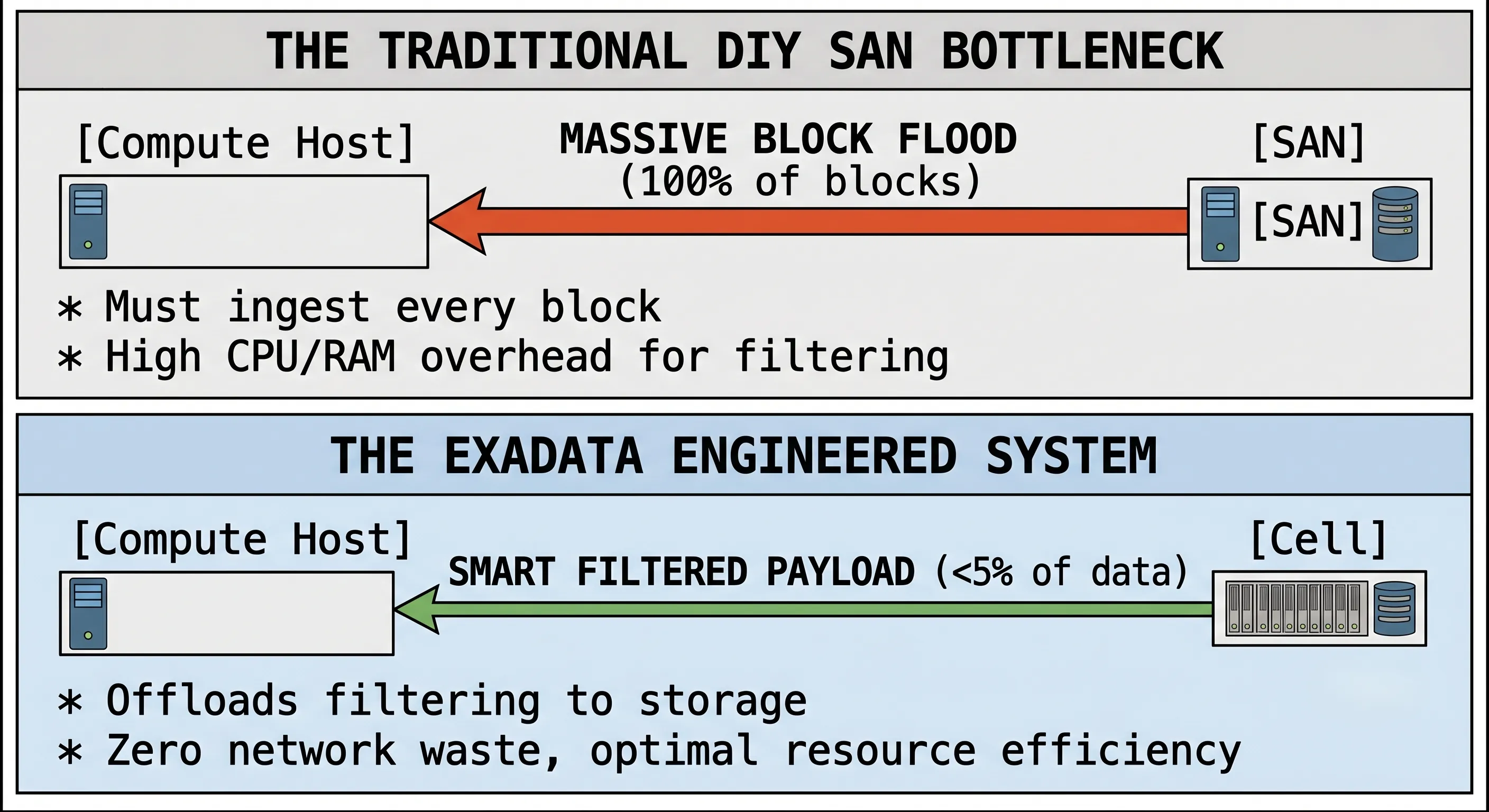
Figure 4 · DIY SAN block flood vs Exadata smart filtered payload
Generic Networking vs. Co-Engineered Protocols
DIY setups route every packet through OS context switches, buffer copies, and hardware interrupts. Exadata embeds kernel-bypass mechanisms and Direct-to-Wire OLTP protocols directly into the infrastructure — something third-party vendors cannot reproduce without Oracle's co-engineering.
08 · Which Workloads Benefit Most from Exadata?
Exadata is built to consolidate diverse, competing database workloads without cross-talk performance degradation.
| Workload Type | Key Exadata Features | Business Impact |
|---|---|---|
| High-Volume OLTP | RoCE RDMA reads, Smart Flash Logging | Microsecond index lookups; massive concurrent transaction volumes |
| Data Warehousing / Analytics | Smart Scan, Hybrid Columnar Compression (10x–50x) | Filtering at storage; reduced I/O scan runtimes |
| Database Consolidation | I/O Resource Management (IORM), Multitenant (PDB/CDB) | Critical OLTP isolated from batch analytics at the hardware queue level |
Production Deployment Sectors
- Core Banking: Low-latency transaction logs plus real-time fraud analytics on the same platform.
- Global ERP (E-Business Suite, SAP, PeopleSoft): Consolidated manufacturing, supply chain, and HR on a single HA cluster.
- Healthcare EHR: Petabyte-scale records where query speed and data integrity are non-negotiable.
09 · Common Myths About Oracle Exadata
Myth 1: Exadata is just expensive generic hardware with marketing labels.
Reality: Standard form factors, yes. The value is in cellsrv, custom firmware, and database kernel rewrites. No generic hardware stack reproduces Smart Scan or automated Storage Index pruning.
Myth 2: You still need a separate SAN for storage.
Reality: Storage Cells replace traditional SAN arrays. ASM handles allocation, redundancy, and backup inside the system.
Myth 3: Storage Cells are just SAN units with a different nameplate.
Reality: A standard SAN is passive — it cannot parse SQL or filter Oracle blocks. Storage Cells run dedicated Linux environments and execute query logic.
Myth 4: Smart Scan is the only feature that matters.
Reality: Smart Scan dominates analytics. For OLTP, Smart Flash Logging and RoCE RDMA deliver massive gains even when Smart Scan never runs.
Myth 5: Any NVMe server can match Exadata.
Reality: Local NVMe delivers fast reads. It lacks predicate offloading, shared HA cluster fabric, and kernel-bypass networking at scale.
Myth 6: Oracle Database performs the same on all hardware if CPU and RAM match.
Reality: The kernel contains Exadata-specific code branches — offloading, Storage Index management, IORM — disabled on non-Exadata systems.
10 · Production Best Practices
1. Workload Optimization and Index Design
- Review redundant secondary indexes — Smart Scan and Storage Indexes often make full scans faster than index tree navigation on Exadata.
- Apply HCC:
COMPRESS FOR QUERYfor active DW data,COMPRESS FOR ARCHIVEfor historical stores.
2. Database Consolidation Strategies
- Configure IORM — never rely on OS-level controls alone when consolidating multiple databases.
- Group workloads into PDBs within a CDB to maximize SGA utilization across Compute Nodes.
3. Monitoring, Diagnostics, and Lifecycle Tuning
- Use ExaWatcher for cell-level metrics: cell CPU, flash write latency, RoCE packet drops.
- Schedule weekly
exachkaudits to keep firmware, OS, and database patches aligned with Oracle baselines.
11 · Frequently Asked Questions
Can I run non-Oracle workloads on Exadata Compute Nodes?
Yes. Compute Nodes can run enterprise apps or middle-tier software, including Oracle VM / KVM. Smart Scan and storage offloading apply only to Oracle Database processes.
What is the difference between InfiniBand and RoCE in Exadata?
Legacy generations (up to X8) used InfiniBand. From X8M through X10M, Oracle uses RoCE on 100 Gbps Ethernet — same low-latency RDMA, simpler datacenter networking.
How does Exadata handle Storage Cell failures?
ASM mirrors data across cells (Normal or High Redundancy). If a cell fails, reads redirect to surviving mirrors without database downtime.
Do I need to modify application code for Exadata?
No. SQL, PL/SQL, and ORM frameworks require zero changes. The database kernel automatically translates queries into optimized Exadata operations.
Write-Through vs Write-Back Flash Cache?
Write-Through: Writes commit to disk and flash simultaneously — maximum protection, disk-speed writes. Write-Back: Writes go to flash first with async destaging — significantly higher transactional write throughput.
Can I scale Exadata as data volumes grow?
Yes. Start with a Quarter Rack or Base Rack and scale out by adding Compute Nodes or Storage Cells without taking the cluster offline.
Storage Index vs traditional database index?
Database indexes are physical structures you create and maintain. Storage Indexes are automated, in-memory, and require no DBA configuration — they exclude irrelevant blocks during scans using min/max tracking.
Does Exadata support encryption without performance loss?
Yes. Hardware AES-NI / AMD crypto extensions decrypt blocks inside storage cells during Smart Scans. Combined with Oracle TDE, you get strong security with minimal overhead.
What role does ExaWatcher play?
ExaWatcher runs continuously on Exadata nodes, capturing network, storage cell, kernel, and block queue statistics that standard AWR reports may miss.
12 · The Short Version — 8 Reasons Exadata Is More Than a Database Appliance
- Engineered System, Not an ApplianceHardware and software are designed together — not assembled from independent components.
- Single Optimized PlatformCompute Nodes, Storage Cells, networking, Flash Cache, and Oracle Database work as one system.
- Intelligent Storage CellsStorage actively processes SQL through Smart Scan and Cell Offloading — it is not passive block storage.
- Flash That Understands WorkloadsSmart Flash Cache and Smart Flash Logging accelerate operations with workload-aware caching and write optimization.
- RoCE RDMA NetworkingUltra-low-latency communication between Compute Nodes and Storage Cells via kernel-bypass RDMA.
- Full-Stack OptimizationEvery layer — firmware, OS, database, storage — is tuned to reduce unnecessary data movement.
- Purpose-Built for Oracle DatabaseTraditional appliances use generic infrastructure. Exadata is built specifically for Oracle workloads.
- Integration Is the AdvantageThe greatest benefit is not one feature — it is how every component works together for performance, scale, and availability.
A database appliance combines powerful components. An Engineered System makes those components think and work as one. That is why Oracle Exadata is not simply faster hardware — it is a fundamentally different way of running Oracle Database.
At ExaGuru, our Exadata Expert course covers ExaCC, ExaCS, Smart Scan tuning, IORM, and production migration patterns — because understanding the architecture is the first step to exploiting it.