01 · The 20x Scenario
Consider a scenario common to enterprise data centers: an identical Oracle database instance, containing the exact same tables, schemas, and data volume, is deployed across two distinct environments.
The first environment is a bespoke, high-end traditional infrastructure configuration consisting of enterprise-grade x86 compute nodes connected via a redundant 32 Gbps Fibre Channel Storage Area Network (SAN) to a top-tier solid-state storage array. The second environment is an Oracle Exadata Engineered System.
A database administrator executes an identical analytical query across both environments.
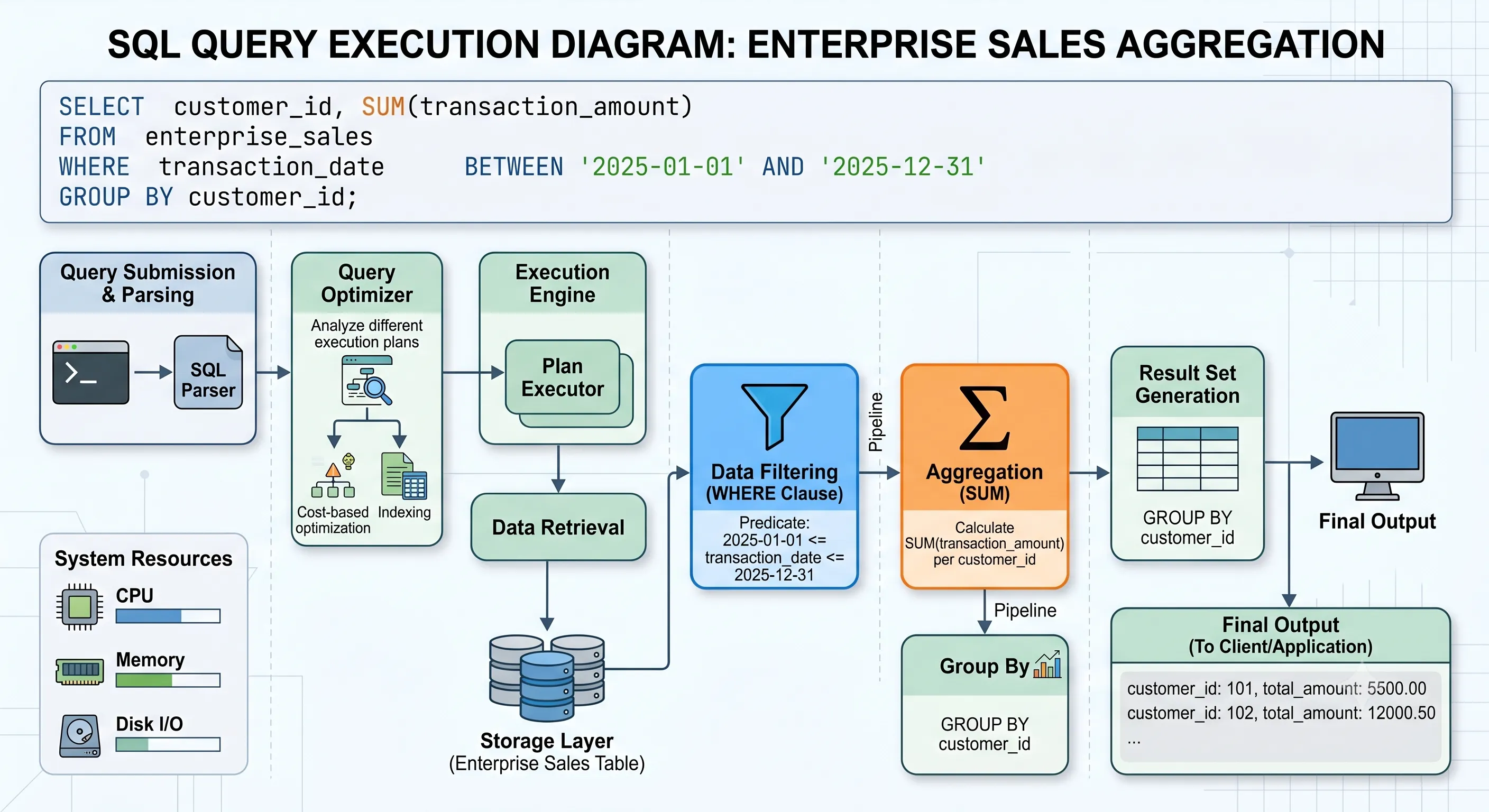
Figure 1 · Same query, same data — radically different execution paths
Session accumulates db file scattered read wait events. CPU sits idle while raw blocks traverse the Fibre Channel fabric.
Session exhibits cell smart table scan events. Filtering and column projection happen inside storage cells before data crosses the network.
Why does this massive performance discrepancy exist? Both platforms utilize top-tier multi-core processors, gigabytes of RAM, and solid-state flash media. The traditional architecture is well-architected and contains no obvious configuration errors. Yet, Exadata outpaces it by a factor of 20x.
To understand this performance gap, we must look beyond basic compute metrics like clock speeds and core counts. The answer lies in a fundamental architectural rethink of how data moves between storage media and CPU cores.
Q: What makes Oracle Exadata faster than a traditional SAN?
A: Oracle Exadata bypasses traditional SAN storage bottlenecks by moving database processing directly to the storage layer via Cell Offloading. While a traditional SAN must transfer millions of raw rows over a network to the compute node for filtering, Exadata's Smart Scan filters data at the storage cell level, returning only the requested, relevant rows to the database server.
02 · Why Isn't CPU the Biggest Performance Bottleneck?
For decades, hardware procurement for database workloads followed a predictable pattern: if a database is slow, buy faster CPUs or add more processing cores. However, in enterprise database systems, raw CPU processing capacity is rarely the primary performance bottleneck for large-scale data processing. The true limiting factor is the Von Neumann Bottleneck — the fundamental throughput limitation imposed by the physical separation of the compute processing units and the data storage subsystems.
In a traditional database architecture, when a query executes a full table scan or a large index scan, the CPU on the database server sits idle, trapped in a wait state while data is fetched across the storage network. The execution path is constrained by several physical layers:
- The Internal Storage Controller Layer: The solid-state or spinning disks must locate the blocks and push them to the storage array controller's cache.
- The Storage Network Fabric: Data blocks are converted into frames and serialized across Fibre Channel or iSCSI networks.
- The Host Bus Adapter (HBA) and Kernel Driver Layer: The database server's operating system kernel must process the incoming network frames, manage interrupts, and move data into kernel memory space.
- The Memory Bus (System Bus): Data is copied from kernel space into the Oracle Database System Global Area (SGA) or Program Global Area (PGA) across the local memory bus.
Throughout this entire lifecycle, the database server's multi-core CPUs are essentially starved for data. They cannot evaluate the WHERE clause or compute the SUM aggregate until the raw database blocks physically arrive in the local memory.
When you scale up a traditional server by adding more CPU cores, you do not solve this problem; you merely accelerate how quickly the database can process data after it has already arrived in memory. The pipe connecting the storage to the compute remains entirely saturated.
Traditional architectures move massive volumes of data to the query, rather than moving the query logic to the data. This structural inefficiency is the "Data Mover" paradox.
Furthermore, traditional database architectures suffer from a critical lack of intelligence at the storage layer. Standard SAN arrays operate on a block-level abstraction. The storage array has no conceptual understanding of an Oracle database block, a table row, a column datatype, or a SQL query context. If a query requires a single column from a 100-gigabyte table, a traditional SAN must transfer all 100 gigabytes of raw data blocks over the network to the database server.
03 · What Actually Makes Exadata Different?
Oracle Exadata breaks away from standard server design by implementing an Engineered System model. Instead of assembling general-purpose servers, switches, and storage components from disparate vendors, Exadata co-designs hardware and software from the ground up specifically to run the Oracle Database.
At the core of the Exadata philosophy is the elimination of the storage network bottleneck through vertical integration. Exadata merges the database management software layer directly with an intelligent storage operating system known as Exadata Storage Server Software (CellOS).
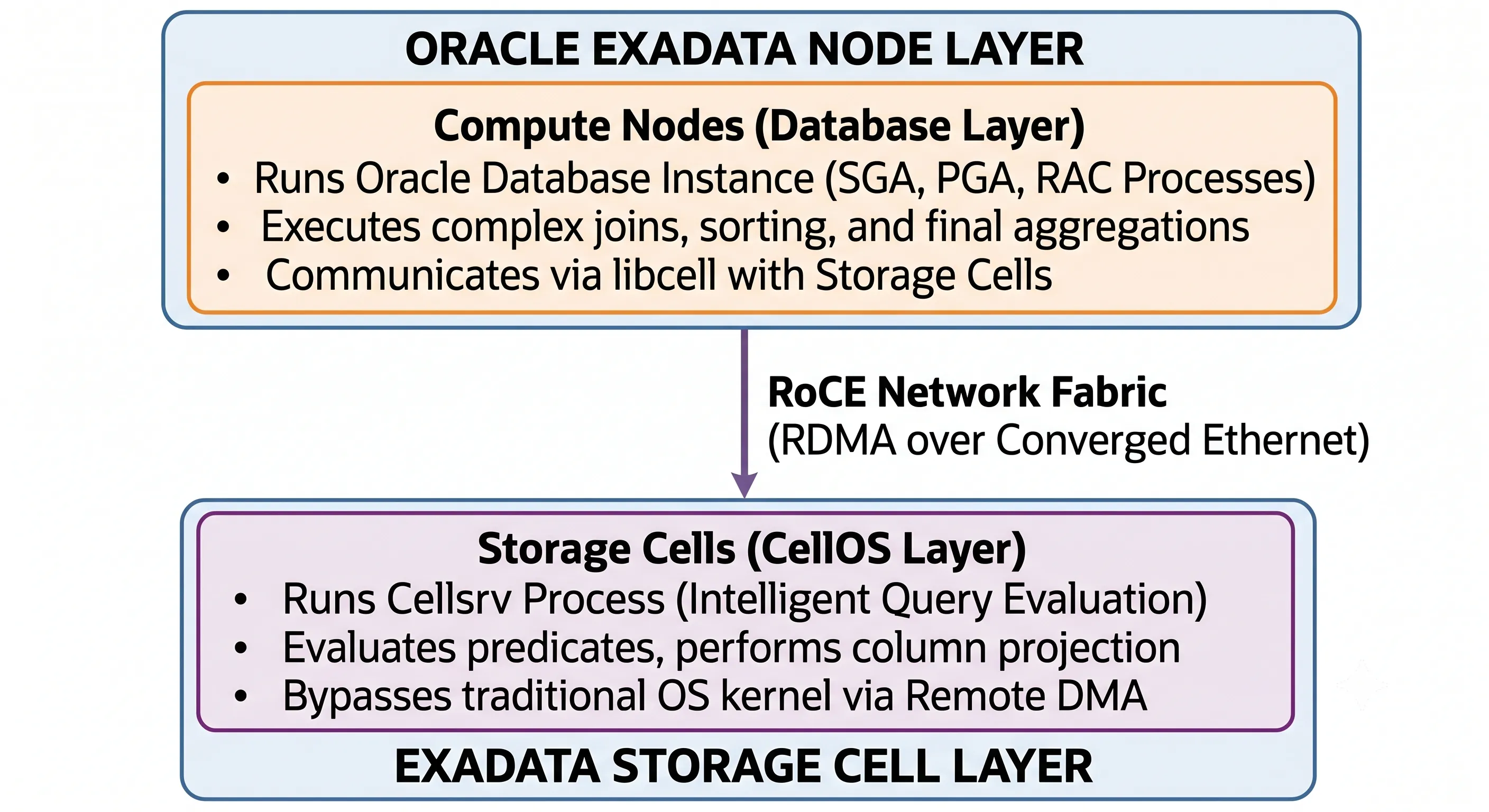
Figure 2 · Exadata vertical integration — compute nodes and intelligent storage cells
Instead of sending raw blocks over a standard network protocol, Exadata uses an optimized direct-to-wire protocol built on top of a unified network fabric. This allows the compute tier and the storage tier to communicate using high-level database commands rather than low-level block I/O requests.
Furthermore, Exadata incorporates heterogeneous processing. The storage cells themselves are not just passive disk shelves; they are self-contained x86 servers equipped with substantial CPU capacity, large system memory, and highly optimized NVMe flash storage tiers. By distributing processing power directly into the storage layer, Exadata creates an architecture capable of parallelizing data processing at the storage level before the data ever encounters a network switch or a database server host bus adapter.
In modern Exadata generations (X8M, X9M, and X10M), the internal network fabric relies on 100 Gbps RoCE (RDMA over Converged Ethernet) switches — allowing compute nodes to read storage cell memory directly without CPU overhead, delivering sub-millisecond end-to-end latency.
04 · How Do Compute Nodes and Storage Cells Work Together?
An Exadata rack is physically and logically partitioned into two distinct server tiers connected by a dedicated, high-bandwidth, ultra-low-latency network fabric: Compute Nodes (Database Servers) and Storage Cells (Storage Servers).
1. The Compute Nodes
The Compute Nodes are high-performance enterprise servers optimized for compute-intensive tasks. They run Oracle Linux and execute the Oracle Database instance software (including Real Application Clusters (RAC) if configured). These nodes host the instance memory structures (SGA and PGA) and manage transaction concurrency, lock serialization, connection pooling, complex relational operations (such as hash joins and parallel sorts), and PL/SQL block execution.
2. The Storage Cells
The Storage Cells are specialized hardware units dedicated to data persistence and intelligent data operations. They run Exadata Storage Server software and host physical storage media — typically a combination of high-capacity mechanical drives, high-performance NVMe PCIe Flash drives, and in newer generations, Extreme Flash or persistent memory components.
RoCE and Remote Direct Memory Access (RDMA)
In modern Exadata generations (X8M, X9M, and X10M), the traditional InfiniBand network fabric has been replaced with RoCE (RDMA over Converged Ethernet) running over 100 Gbps or 200 Gbps links. RoCE enables Remote Direct Memory Access (RDMA), allowing a Compute Node to directly read or write to the memory space of a Storage Cell — completely bypassing the operating system kernels, network protocol stacks, and CPU contexts on both sides.
When a Compute Node requires data that cannot be optimized via offloading, it performs an RDMA read directly from the Storage Cell's NVMe flash memory or cache. The latency of this transaction is measured in single-digit microseconds, matching or exceeding the performance of internal PCIe storage buses on standalone servers.
05 · What Is Smart Scan?
The single most impactful architectural feature responsible for Exadata's performance superiority is Smart Scan. Smart Scan represents a paradigm shift: instead of pulling storage blocks up into the database server's memory, the database server pushes the SQL processing logic down into the storage cells.
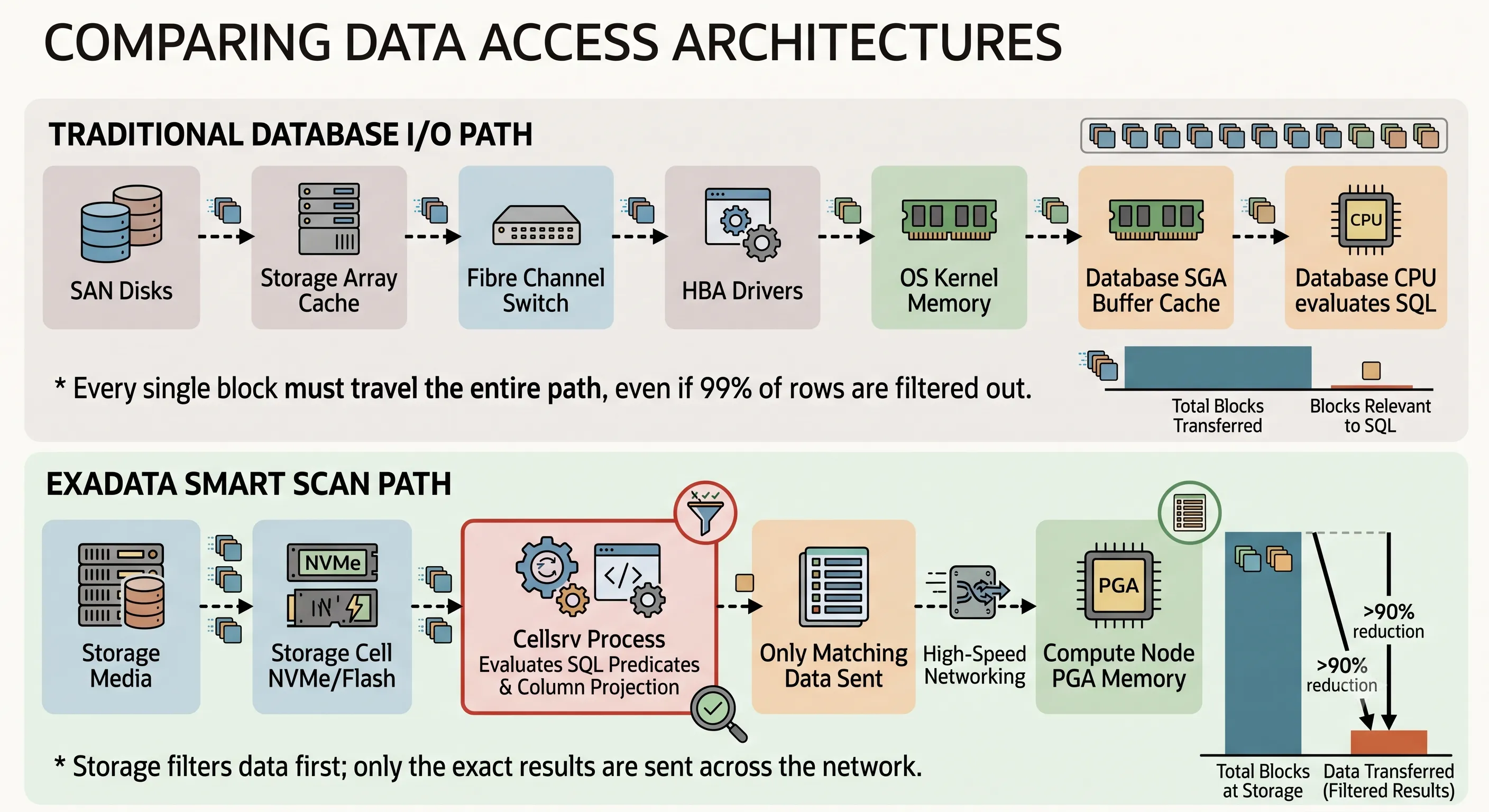
Figure 3 · Smart Scan pushes query logic to storage — dramatically reducing network I/O traffic
Q: How does Exadata Smart Scan work?
A: Exadata Smart Scan offloads SQL processing — specifically column projection and predicate filtering — to the storage cells. It utilizes Storage Indexes to completely skip blocks that don't contain relevant data, drastically reducing physical I/O and maximizing data throughput.
When a SQL statement is executed on a Compute Node, the Oracle Optimizer evaluates whether the operation can utilize a Direct Path Read. If chosen, the compute node utilizes a dedicated interface library called libcell, which intercepts the standard Oracle block I/O request and converts it into an Exadata Smart Scan command descriptor containing:
- Predicate Filters — WHERE clause conditions (e.g.,
transaction_date BETWEEN '2025-01-01' AND '2025-12-31') - Column Projections — specific columns requested in SELECT and GROUP BY (e.g.,
customer_idandtransaction_amount)
Within each Storage Cell, the multi-threaded cellsrv process receives the descriptor and executes two primary optimizations:
Column Projection
If a table contains 150 columns but the query only requests 2, cellsrv extracts only those 2 target columns. The remaining 148 columns are completely ignored and never cross the network.
Predicate Filtering
cellsrv evaluates WHERE clause conditions directly against row pieces within the storage cell. If 10,000 rows exist in a block but only 5 match the date criteria, 9,995 rows are discarded before transmission.
The storage cell packages only the filtered, column-projected data into a highly compressed network packet and streams it directly into the querying session's PGA on the Compute Node — reducing transferred data from gigabytes of raw blocks to megabytes of precise result sets.
06 · Why Does Cell Offloading Matter?
The capabilities of the Exadata Storage Cell extend beyond basic row and column filtering. Cell Offloading encompasses a suite of database management operations pushed out of the Compute Node and processed concurrently across the storage tier.
1. Hybrid Columnar Compression (HCC) Offloading
Traditional database compression operates at the block level within standard 8KB or 16KB database blocks. Exadata introduces Hybrid Columnar Compression (HCC), which reorganizes data into Compression Units (CUs) — pivoting row-oriented data into a columnar format where identical column values are grouped and compressed together.
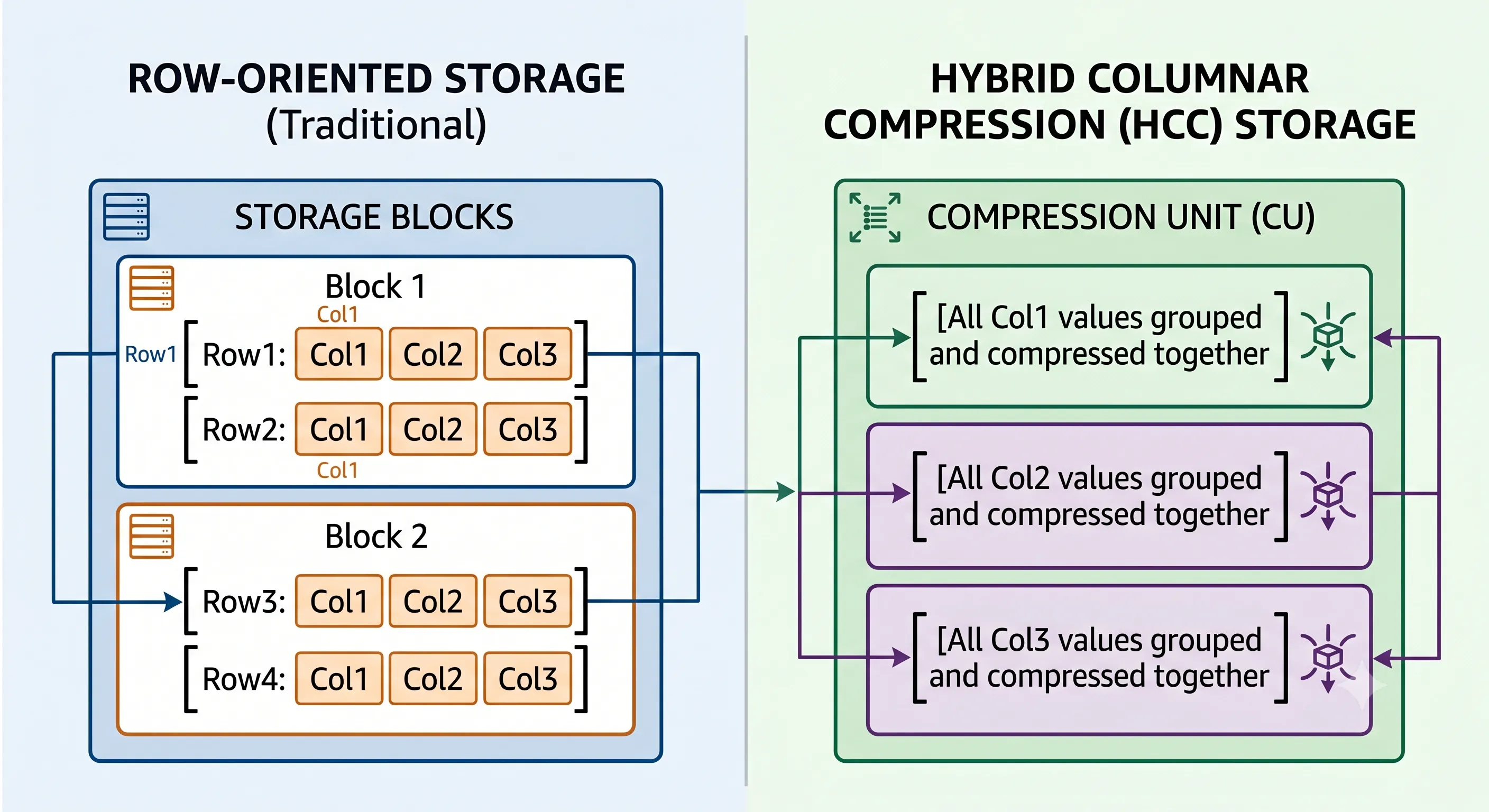
Figure 4 · HCC pivots rows into columnar Compression Units — achieving 10x to 50x compression ratios
Because identical column data types and repeating values are stored adjacently, compression algorithms achieve massive ratios — often ranging from 10x to over 50x for data warehousing environments using Query High or Archive High compression algorithms.
On Exadata, the decompression workload is fully offloaded to the Storage Cells. The cellsrv process decompresses columnar segments directly within storage server memory during a Smart Scan — the database server benefits from storage savings and reduced network payload without incurring CPU decompression overhead.
2. Storage Indexes
A Storage Index is an in-memory structural component created and maintained automatically by Exadata Storage Server software inside each Storage Cell. It requires zero configuration or DBA maintenance.
Storage Indexes divide physical disk or flash space into logical chunks called Storage Regions (typically 1 MB). For each region, the index tracks minimum and maximum values of columns frequently used in SQL predicates. When a Smart Scan arrives, cellsrv compares WHERE clause literals against stored min/max values — instantly skipping entire 1MB regions with no physical I/O.
This mechanism achieves performance gains similar to partition pruning or indexing without creating physical database objects or consuming storage overhead.
3. Decryption Offloading
For organizations utilizing Transparent Data Encryption (TDE), Exadata offloads decryption directly to the hardware cryptographic accelerators embedded within Storage Cell CPUs. Encrypted blocks are decrypted inline by the storage cell before predicate filtering — ensuring security compliance with zero compute tier overhead.
07 · How Does Flash Cache Accelerate Reads and Writes?
While Smart Scan accelerates large-scale analytical scanning workloads, OLTP environments require ultra-low latency for single-row random I/O operations. Exadata achieves this via a tiered, hardware-integrated caching architecture called Exadata Smart Flash Cache and Smart Flash Log.
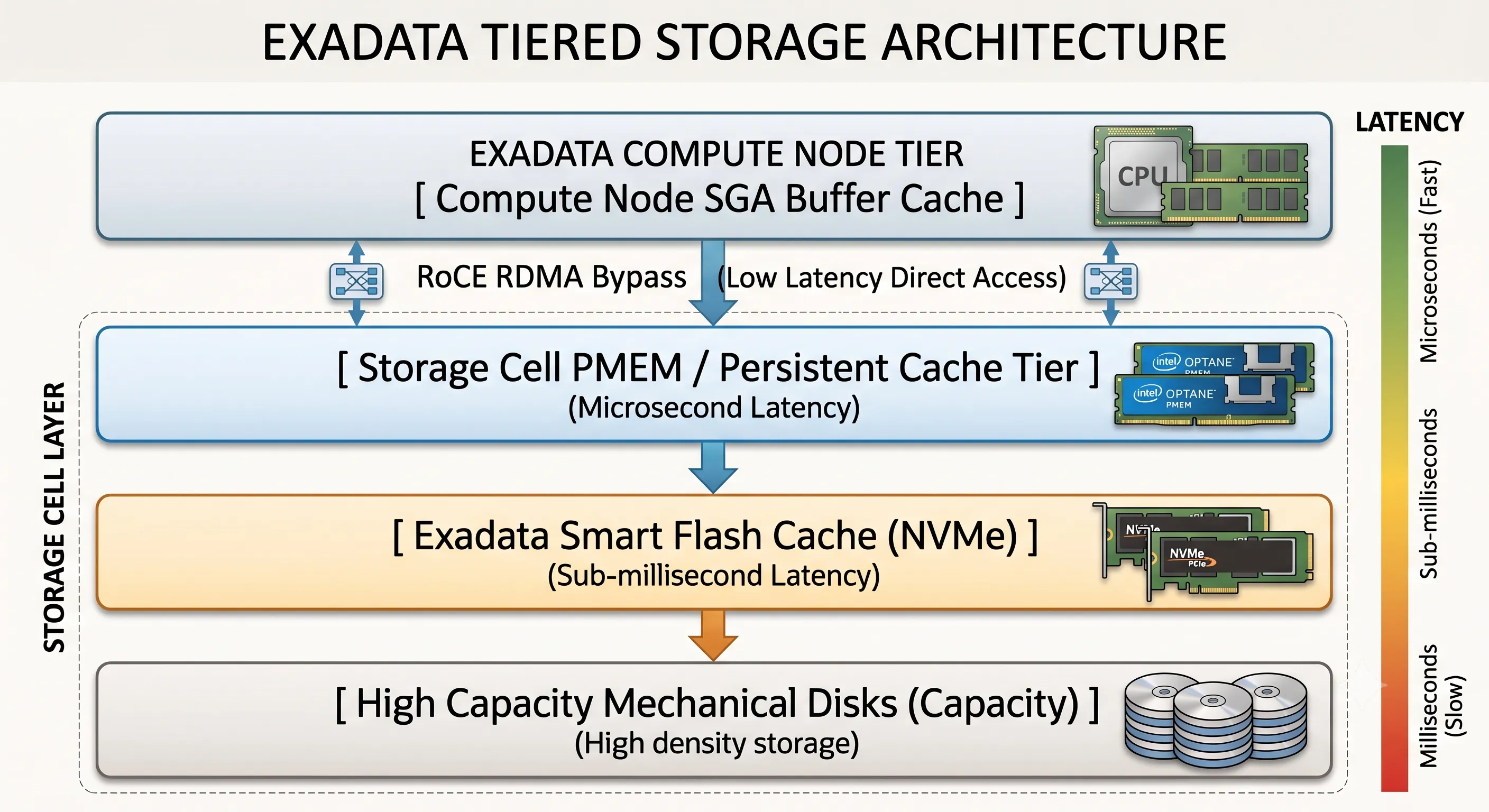
Figure 5 · Exadata tiered storage — from persistent memory to capacity disks
Exadata Smart Flash Cache
Unlike standard storage array caches that operate on a Least Recently Used (LRU) block algorithm, the Exadata Smart Flash Cache is fully database-aware. It communicates with the database kernel to understand the nature of each data block being processed.
- Intelligent Block Inclusion/Exclusion: Large sequential table scans are automatically recognized and bypass the Smart Flash Cache to avoid cache pollution.
- Columnar Flash Caching: Exadata can transform standard row-structured blocks into an optimized columnar layout when loading them into Smart Flash Cache — enabling Smart Scans directly against flash in columnar format.
Exadata Smart Flash Log
In OLTP databases, the primary bottleneck for write transactions is commit latency from writing redo log entries to persistent media. The Smart Flash Log intercepts these critical write operations, parallelizing redo log writes simultaneously to mechanical disks and ultra-low-latency NVMe flash cells.
The moment the Flash Log confirms the write — in a fraction of a millisecond — the transaction is marked committed and control returns to the application. The slower disk write finalizes asynchronously, eliminating log writer bottlenecks during high-throughput OLTP spikes.
08 · Comprehensive Architectural Comparison
To visualize the radical structural divergence between these platforms, here is a side-by-side comparison across key engineering boundaries:
| Engineering Boundary | Traditional SAN Architecture | Oracle Exadata |
|---|---|---|
| Storage Intelligence | Block-level abstraction; no SQL awareness | Database-aware cellsrv with predicate filtering & column projection |
| Network Fabric | 32 Gbps Fibre Channel / iSCSI | 100/200 Gbps RoCE with RDMA (sub-microsecond latency) |
| Data Movement Model | Move all raw blocks to the query (Data Mover paradox) | Move query logic to the data (Smart Scan / Cell Offloading) |
| Compression Handling | CPU on database server decompresses every block | HCC decompression offloaded to Storage Cells |
| Encryption (TDE) | Compute node CPU handles all decryption | Hardware crypto accelerators on Storage Cells |
| Storage Filtering | Requires physical indexes or full table scans | Automatic Storage Indexes (min/max per 1MB region) |
| OLTP Commit Latency | Log writer waits for disk persistence | Smart Flash Log confirms commits in microseconds |
| Flash Cache Strategy | LRU block eviction; no query context | Database-aware inclusion/exclusion; columnar flash caching |
| Multi-Workload Isolation | Shared SAN bandwidth; reporting starves OLTP | IORM enforces I/O allocation at the cell queue layer |
| Oracle Licensing Scope | All database server cores licensed | Only Compute Node cores licensed; Storage Cell CPUs excluded |
09 · Which Workloads Benefit the Most?
1. Data Warehousing and Decision Support Systems (DSS)
Data warehouses are characterized by sweeping analytical queries that scan hundreds of millions of rows. In this arena, Exadata delivers its most profound performance leaps. The combination of Smart Scan, Hybrid Columnar Compression, and Storage Indexes completely eliminates the traditional I/O bottleneck. Queries that would execute for hours on a standard SAN finish in minutes or seconds because 95% of raw data processing is performed concurrently across the distributed storage cell tier.
2. Online Transaction Processing (OLTP)
Exadata accelerates OLTP via RoCE-driven RDMA (bypassing OS layers for random block fetches in single-digit microseconds), Smart Flash Log (eliminating commit serialization bottlenecks), and Advanced Resource Allocation ensuring high-frequency transactions are never starved by background processes.
3. Mixed Workloads and Database Consolidation
Historically, running OLTP and analytical data warehousing on the same shared hardware was problematic. Exadata resolves this through hardware separation coupled with IORM (I/O Resource Manager) — a deep scheduling engine inside Exadata Storage Server software that integrates directly with Oracle Database Resource Manager.
Using IORM, architects can define precise rules: "Allocate 80% of I/O bandwidth to the OLTP database during business hours. Analytical queries can utilize remaining capacity, but must instantly yield when an OLTP request occurs." Because IORM operates at the physical cell processing queue layer, it enforces these rules with absolute precision.
10 · When Should Companies Choose Exadata?
Oracle Exadata represents a significant capital or operating investment. It is not intended for small-scale, non-critical database deployments. Organizations should look to migrate to Exadata when facing:
SLA Breaches on Mission-Critical Systems
When critical batch windows, end-of-month financial closings, or real-time inventory calculations fail due to I/O constraints.
Unmanageable Infrastructure Sprawl
When maintaining dozens of isolated database servers and storage arrays leads to astronomical licensing, power, cooling, and management costs.
Prohibitive Oracle Licensing Costs
Because Exadata offloads processing to storage cell CPUs (which do not require Oracle Database core licenses), companies can frequently decrease their overall compute tier core footprint.
Hybrid and Cloud Migration Strategy
Exadata provides identical architecture across on-premises hardware, Exadata Cloud@Customer (ExaCC), and Exadata Cloud Service (ExaCS) within OCI — enabling cloud migration with zero application rewrites.
11 · Oracle Best Practices for Exadata
Deploying an Exadata engineered system does not automatically guarantee optimal performance if database design patterns ignore the underlying architecture. DBAs must align their methodology with Exadata's capabilities:
- Optimize for Direct Path ReadsSmart Scan is only triggered via Direct Path Reads. Monitor execution plans for cell smart table scan events. Ensure
DB_FILE_MULTIBLOCK_READ_COUNTis properly optimized and avoid parameters that artificially depress parallel execution. - Modernize Indexing StrategiesOn Exadata, over-indexing can degrade performance. Smart Scan coupled with Storage Indexes can scan tables at wire speed — evaluate, drop, or convert unneeded indexes to INVISIBLE status.
- Implement Hybrid Columnar Compression WiselyUse ARCHIVE HIGH for cold historical tables and QUERY HIGH or QUERY LOW for active data warehousing structures. Avoid HCC on tables with continuous high-volume single-row updates.
- Enable and Configure IORMNever leave IORM unconfigured in a multi-tenant or consolidated environment. Define inter-database plans and intra-database consumer groups immediately upon deployment.
12 · Technical Frequently Asked Questions
Does Smart Scan work with index scans, or only with full table scans?
Smart Scan works primarily with full table scans and full index scans (Fast Full Index Scans). It can also be utilized during index range scans under specific parallel execution rules. It does not trigger for single-row lookups via a unique index, as those are optimized via direct ultra-low latency RoCE memory lookups.
Do I need to buy Oracle Database licenses for the CPU cores inside the Storage Cells?
No. Oracle Database options (RAC, Partitioning, Advanced Security) are licensed exclusively against CPU cores on Compute Nodes. Storage Cell CPU processing is covered entirely by the Exadata Storage Server Software license.
What happens if a Storage Cell fails entirely? Is data lost?
Exadata relies on Oracle ASM with Normal Redundancy (2-way mirroring) or High Redundancy (3-way mirroring). With High Redundancy, data blocks are mirrored across independent Storage Cells. If a cell fails catastrophically, Compute Nodes instantly redirect I/O to mirrored blocks on surviving cells via RoCE.
Can I run non-Oracle workloads, such as PostgreSQL or SQL Server, on Exadata?
Compute Nodes run Oracle Linux, so other software could technically be installed. However, Smart Scan, Cell Offloading, Storage Indexes, and Smart Flash Cache are hard-coded to interface exclusively with the Oracle Database kernel via libcell. Non-Oracle databases will treat Exadata as simple, unoptimized block storage.
How does Exadata handle unindexed columns in a WHERE clause?
On Exadata, an unindexed column filter is an ideal candidate for Smart Scan. The cellsrv process scans raw data blocks, filters non-matching records, and returns only matching rows — dramatically reducing the performance penalty of unindexed columns.
What is the difference between InfiniBand and RoCE in Exadata architectures?
From Exadata X2 through X8-2, Oracle utilized InfiniBand. Starting with X8M (continuing through X9M, X10M), Oracle transitioned to RoCE (RDMA over Converged Ethernet) at 100/200 Gbps — delivering lower end-to-end latency than the older 40 Gbps InfiniBand fabric.
Does Hybrid Columnar Compression (HCC) degrade write performance?
HCC is highly optimized for bulk loading (INSERT /*+ APPEND */ or direct path SQL*Loader). Frequent single-row UPDATE operations can cause performance degradation because updating a row requires decompressing the column segment, modifying data, and writing it back. HCC is best suited for read-mostly or append-only data structures.
How does Exadata's Smart Flash Cache differ from standard flash caching in other SAN arrays?
Standard SAN caches are block-agnostic and operate on block address frequency. Exadata Smart Flash Cache is fully integrated with the database engine — it knows the object type, query intent, and execution plan, caching high-value blocks while bypassing blocks that would thrash the cache.
13 · The Short Version — 8 Things Every DBA Should Know
If you are a Database Administrator preparing to manage or evaluate an Oracle Exadata environment, memorize these core engineering truths:
- Stop Tuning for Network I/O OverheadsThe traditional Fibre Channel network bottleneck is fundamentally eliminated via high-speed RoCE fabrics and Remote Direct Memory Access (RDMA).
- Smart Scan is Pushed-Down LogicRow filtering and column extraction happen inside the storage cell memory. Only the filtered results are sent back to the compute node.
- No Direct Path Read Means No Smart ScanIf your SQL execution plans do not show direct path read operations, your query is fetching blocks through the standard SGA buffer cache, completely bypassing Exadata's offloading capabilities.
- Storage Cells Free Up Core LicensesBy offloading decryption, decompression, and predicate scans to storage servers, you free up compute tier CPUs and maximize the value of your core-based Oracle Database software licenses.
- Storage Indexes Cost NothingUnlike physical database indexes, Storage Indexes exist completely in storage cell memory. They require no space management, are built automatically, and track min/max data ranges to skip unnecessary physical reads.
- Redo Log Latency is Masked by FlashThe Exadata Smart Flash Log intercepts log writer flushes and commits them to high-speed NVMe flash parallel to disk, eliminating transactional commit bottlenecks.
- Over-Indexing is an Anti-Pattern on ExadataYou can often drop complex secondary indexes that were originally built to prevent full table scans. Exadata can scan raw tables at wire speed, saving space and improving OLTP insert performance.
- IORM is Mandatory for ConsolidationNever run multiple databases on an Exadata rack without configuring the I/O Resource Manager. It is the only way to prevent large analytical queries from causing resource starvation on your transaction processing engines.
The Architecture Is the Advantage
The 20x performance gap between a well-architected traditional SAN and Oracle Exadata is not a configuration error on either side. It is the predictable outcome of two fundamentally different approaches to the same problem: how to get the right data to the right CPU at the right time.
Traditional architectures optimize for compute. Exadata optimizes for data movement — pushing query intelligence into storage, eliminating the Von Neumann bottleneck, and returning only what the SQL actually needs.
Exadata does not win because it has faster disks. It wins because it refuses to move data the database will immediately throw away.
At ExaGuru, our Exadata Expert course covers ExaCC, ExaCS, Smart Scan tuning, IORM configuration, and production migration patterns — because understanding the architecture is the first step to exploiting it.