01 · The Multi-Million Dollar Infrastructure Trap
Every year, enterprise IT departments sign off on Oracle Exadata purchase orders with a simple, flawed expectation: throw faster hardware at the problem, and our performance issues will vanish. Some of these deployments yield spectacular, game-changing speeds. Others result in millions of dollars spent on an engineered system only to discover that the core business applications still move at a crawl.
When an Exadata deployment underperforms, the hardware is rarely the culprit. The breakdown almost always traces back to a lack of rigorous, pre-purchase workload analysis. Oracle Exadata is an engineered system designed for specific workload patterns. Buying it without understanding your database workload, storage requirements, licensing implications, and growth strategy is one of the most expensive mistakes an IT team can make.
The good news is that nearly every failed Exadata project leaves behind lessons that future deployments can avoid. Let's walk through the eight questions every architect, DBA, and infrastructure team should answer before buying Oracle Exadata.
Not every Oracle database can leverage Smart Scan, Storage Indexing, or Columnar Caching — and without those features, Exadata is just expensive commodity hardware.
Software licensing often costs multiple times the physical hardware. Capacity-on-Demand (CoD) and core mapping must be settled before procurement.
Enterprise benchmarks indicate that consolidation onto Exadata can reduce licensing from 80 disparate cores to 24 efficient cores — but only with proper planning.
02 · Does Every Oracle Database Actually Need Exadata?
Direct answer: No — Exadata only delivers its price-to-performance value when your workload can leverage Smart Scan, Storage Indexing, and Columnar Caching; databases that cannot use these features will run on Exadata much like they would on any high-end commodity server.
One of the most common misconceptions in modern enterprise IT is that Oracle Exadata is a magic bullet for every performance issue. If a database is running slow on commodity hardware or a generic cloud instance, the immediate temptation is to throw the fastest hardware available at it. But Exadata is not just a standard server with fast disks; it is a highly specialized engineered system built around unique software-hardware integration.
To justify the investment, your workload must be able to leverage Exadata's unique architectural features, such as Smart Scan, Storage Indexing, and Columnar Caching. If a database cannot use these features, it will run on Exadata much like it would on any high-end commodity server — at a fraction of the price-to-performance value.
Workloads That Benefit the Most
Data Warehouses and Analytics (OLAP)
These workloads are Exadata's bread and butter. When you run large queries that scan billions of rows, Exadata's Smart Scan unloads the query processing directly to the storage cells. Instead of transferring terabytes of raw data over the network to the compute nodes, the storage cells filter the data and return only the relevant rows and columns.
High-Throughput OLTP Systems
Online Transaction Processing systems with massive transaction volumes, heavy concurrency, and strict uptime requirements benefit heavily. Exadata's Smart Flash Cache and Persistent Memory (PMEM/XRMEM) layers reduce log write and read latencies to microseconds, eliminating typical I/O serialization bottlenecks.
Mixed Workloads (HTAP)
Systems that require real-time analytics on transactional data. Exadata can isolate resources effectively, ensuring that heavy analytical reports don't starve critical transactional users of CPU or I/O.
Large-Scale Enterprise Applications
Core systems like Oracle E-Business Suite (EBS), SAP on Oracle, PeopleSoft, and custom global banking backends that require absolute maximum availability and predictability.
Situations Where Standard Infrastructure is Sufficient
If you have small, departmental databases (e.g., under 500 GB) with low transactional volume, standard Oracle Database infrastructure — such as a pair of standard x86 servers attached to a traditional All-Flash SAN — is more than sufficient. Similarly, applications that are bound strictly by single-threaded CPU speed or poorly written, unindexed loops will see little to no benefit on Exadata.
Workload Selection Matrix
| Workload Type | Typical Profile | Exadata Fit | Key Exadata Features Used |
|---|---|---|---|
| Data Warehouse / OLAP | Large scans, billions of rows, batch reporting | Excellent | Smart Scan, HCC, Storage Indexes |
| High-Volume OLTP | Heavy concurrency, strict uptime, microsecond latency | Excellent | Smart Flash Cache, PMEM, Smart Flash Log |
| Mixed HTAP | Real-time analytics on transactional data | Excellent | IORM, Resource Manager, Smart Scan |
| Enterprise ERP / Core Banking | Mission-critical, HA/DR, predictable SLAs | Strong | RAC, ADG, ASM redundancy, IORM |
| Small Departmental DB (<500 GB) | Low IOPS, minimal concurrency | Poor ROI | None — standard x86 + All-Flash SAN sufficient |
| CPU-Bound / Bad SQL | Nested loops, missing indexes, chatty app tier | Poor ROI | None — fix application logic first |
Table 1 · Workload selection matrix — when Exadata delivers ROI vs. when standard infrastructure suffices
03 · Have You Identified Your Real Performance Bottleneck?
Direct answer: Exadata eliminates I/O and storage-network bottlenecks — but it cannot fix poor SQL design, missing indexes, application locking contention, or external network latency between app servers and the database.
Dropping an unoptimized database onto Exadata is the architectural equivalent of buying a Formula 1 racing car to commute through gridlocked rush-hour traffic. The machine isn't slow; your environment is simply structurally incapable of letting it run.
If your application performance is currently suffering due to horrific SQL design, missing indexes, or legacy single-threaded code, moving to Exadata will merely make your inefficient code run marginally faster. In worst-case scenarios, the sheer speed of the architecture can actually expose hidden serialization issues, causing application performance to actively degrade.
Hardware vs. Software Bottlenecks
Exadata is engineered to eliminate I/O bottlenecks, network latency between compute and storage, and inter-node cluster communication delays. It cannot rewrite your application logic.
The Bad SQL Trap
Consider an application that executes a query using a nested loop that performs a single-row look-up 10 million times instead of using an efficient hash join. This pattern is bound by single-threaded CPU execution and network round-trips between the app server and the database. Exadata's storage cells cannot optimize this because the query forces row-by-row fetching over the client network.
The Missing Index Dilemma
While Smart Scan can scan unindexed tables incredibly fast by offloading the work to storage, relying on it to fix a complete lack of operational indexing in a high-concurrency OLTP application is a recipe for disaster. Heavy full-table scans across multiple OLTP threads will eventually saturate even the most robust storage cells.
Practical DBA Insights: Diagnosing the Bottleneck
Before signing an Exadata purchase order, a Lead DBA must thoroughly analyze Automatic Workload Repository (AWR) and Active Session History (ASH) reports. Look at your Top 10 Foreground Wait Events:
| Top Wait Events | Root Cause | Will Exadata Help? |
|---|---|---|
db file sequential read, db file scattered read, direct path read |
Storage throughput and latency limited | Yes — drastically |
latch: cache buffers chains, row lock contention, enq: TX - index contention |
Logical concurrency and locking issues | No |
SQL*Net message from client |
Chatty application or distant app servers | No |
Hardware should never be used as a band-aid for broken development practices. Ensure your database is properly tuned, statistics are up to date, and indexes are optimized on your current platform before evaluating Exadata performance baselines.
04 · Have You Sized Your Environment Correctly?
Direct answer: Exadata is purchased in fixed building blocks (Quarter Rack, Half Rack, Full Rack) — you must size CPU, memory, flash/PMEM, and storage growth for a 3–5 year horizon, not just today's workload.
Sizing an Oracle Exadata system is entirely different from sizing general-purpose servers. In traditional infrastructure, if you run out of memory or disk space, you simply order another stick of RAM or provision another LUN from the SAN. With Exadata, you purchase in specific building blocks: Quarter Rack, Half Rack, or Full Rack (or flexible elastic configurations).
The biggest mistake teams make here is sizing for today's workload instead of forecasting their architectural footprint over the next three to five years. Conversely, some teams over-provision compute while drastically under-sizing flash capacity, resulting in sub-optimal cache hit ratios.
Key Dimensions of Exadata Sizing
CPU Sizing
Calculate the absolute peak CPU utilization across all databases planned for migration. Remember to account for Oracle Parallel Execution (PX), which can rapidly consume compute cores during heavy report processing.
Memory (RAM) Requirements
Exadata compute nodes hold your Database Instances (SGA and PGA). If you plan to consolidate dozens of databases via Oracle Multitenant, memory is almost always the first resource constraint you will hit — long before you run out of CPU.
Flash and PMEM Capacity
The performance of your OLTP environment relies heavily on keeping active data inside the Smart Flash Cache and Persistent Memory layers. If your active working dataset is larger than the available Flash capacity, blocks will age out, forcing the system to read from slower spinning disks (if using High Capacity storage cells).
Storage Growth & Compression
Factor in how much data your business generates annually. Don't forget that using Hybrid Columnar Compression (HCC) can shrink data warehouse tables by factors of 3× to 10×, significantly altering your raw storage estimates.
Oracle Exadata Capacity Planning Workflow
According to database architecture frameworks, the following workflow represents the ideal approach to determining your Exadata requirements systematically:
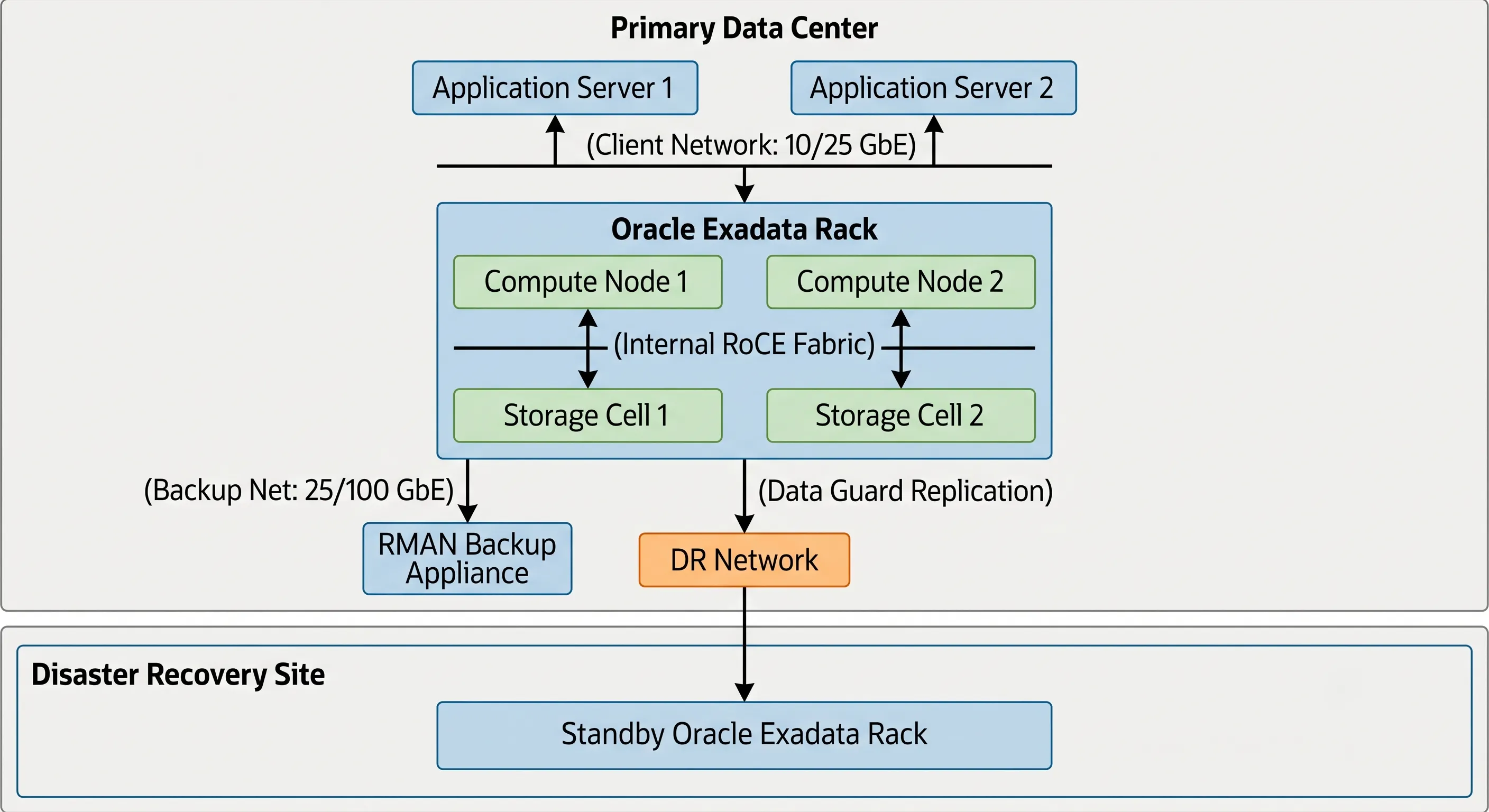
Figure 1 · Oracle Exadata capacity planning workflow — CPU, memory, flash, and HCC-adjusted storage growth
05 · Do You Understand Oracle Licensing Before Purchasing Exadata?
Direct answer: Exadata runs Oracle Database Enterprise Edition, and software licenses often cost multiple times the hardware — you must map core utilization, Capacity-on-Demand (CoD), and optional features (RAC, Multitenant, ADG) before signing any purchase order.
You can buy the most powerful Exadata rack available, but if you do not understand Oracle's licensing rules, you may face an astronomical bill during your next Software Investment Advisory (SIA) audit.
Exadata runs Oracle Database Enterprise Edition (EE). Hardware procurement and software licensing are two entirely separate streams, and the software licenses often cost multiple times the price of the physical hardware.
The Power of Capacity-on-Demand
One of Exadata's most valuable features is Capacity-on-Demand (CoD). When you buy an Exadata compute node, it comes fully populated with physical CPU cores. However, you do not have to license all of them out of the gate.
You can disable cores at the BIOS/hypervisor level and license only what you need. For instance, if a compute node has 64 physical cores, you can choose to enable and license only 14 cores, scaling up as your workload grows.
Essential Software Features to Account For
To maximize an Exadata deployment, you almost always need to license additional enterprise database options. Failing to budget for these options is a common oversight:
- Real Application Clusters (RAC): Exadata compute nodes work as a cluster. To run a single database across multiple nodes for high availability and scalability, RAC licensing is mandatory.
- Oracle Multitenant: Essential if you plan to consolidate hundreds of databases efficiently using Pluggable Databases (PDBs) within a Container Database (CDB).
- Advanced Compression: Required to utilize certain advanced indexing compression mechanisms and secure file optimizations, though basic Hybrid Columnar Compression (HCC) for data warehouses is included with Exadata storage software.
- Active Data Guard (ADG): Vital for robust disaster recovery and offloading read-only reporting workloads to a remote standby Exadata rack.
Never purchase your Exadata hardware until you have mapped out your exact core utilization strategy and had your Oracle licensing representative verify your existing Processor licenses. For more insights on maximizing core density, see our guide on Optimizing Oracle Multitenant Architecture on Modern Hardware.
06 · Are You Planning for Database Consolidation or a Single Workload?
Direct answer: A single-workload Exadata is built for specialization; a consolidation platform requires IORM, Instance Caging, Resource Manager, and KVM isolation to prevent noisy-neighbor resource starvation.
Are you buying Exadata to supercharge a single, massive mission-critical application, or are you treating it as an enterprise-wide cloud platform to host dozens or hundreds of disparate databases?
If you design an Exadata environment for a single workload, you build it with high specialization. If you build it for consolidation, your primary focus shifts to resource isolation, multi-tenancy, and noisy-neighbor prevention.
The Strategy of Consolidation
Exadata shines as a consolidation platform because it was engineered to handle competing workloads simultaneously. Running different applications on shared commodity infrastructure often leads to resource starvation — one bad query can bring down the entire server. Exadata prevents this using built-in, end-to-end resource management.
Key Consolidation Features
IORM
I/O Resource Management controls how storage cell I/O is distributed among databases and PDBs. You can guarantee your core ERP system gets 80% of I/O during a bottleneck.
Instance Caging
Instance Caging and Resource Manager control CPU allocation at the database level, ensuring no single instance can consume all compute cores on a node.
KVM Virtualization
Modern Exadata systems utilize Kernel-based Virtual Machines (KVM) to isolate production, UAT, and development into distinct clusters on the same physical hardware.
07 · Have You Planned Networking, Backup, and Disaster Recovery?
Direct answer: Exadata's internal RoCE fabric is self-contained — you must separately design client networks, high-speed backup paths (10/25/100 GbE to ZDLRA), and Active Data Guard DR before deployment begins.
An Exadata system does not sit in a vacuum; it must integrate cleanly into your existing data center or cloud ecosystem. Many teams treat Exadata like a traditional server deployment, only to hit significant roadblocks during network provisioning, backup scheduling, or disaster recovery architectural reviews.
Networking: The RoCE Interconnect
Modern Exadata systems utilize RoCE (RDMA over Converged Ethernet) for their internal high-speed fabric between compute nodes and storage cells. This internal network is self-contained within the rack.
However, you must plan your Client Network (for application servers connecting to databases) and your Additional/Backup Network (for pulling data out for backups or replication). If your core data center switches cannot handle the uplinks coming from the Exadata top-of-rack switches, you will create external bottlenecks.
Backup Strategy: Moving Data Fast Enough
Exadata can process terabytes of data per second internally, but how do you back it up? If you attempt to run traditional file-based backups over a standard 1 GbE network to an old backup appliance, your backups will take days to complete.
- RMAN Integration: Utilize Oracle Recovery Manager (RMAN) configured to optimize channel allocation across all compute nodes.
- Dedicated Infrastructure: Best practice dictates backing up Exadata to an Oracle Zero Data Loss Recovery Appliance (ZDLRA) or a high-performance Oracle Recovery Appliance via dedicated 10/25/100 GbE backup interfaces to match the system's native output capacity.
Oracle Exadata Production Deployment Architecture
The diagram below illustrates how an Exadata rack integrates with external application tiers, backup infrastructure, and a secondary disaster recovery site:
Figure 2 · Exadata production deployment — client network, RoCE fabric, ZDLRA backup, and DR integration
08 · Are You Ready for the Engineered Lifecycle?
Direct answer: Exadata requires disciplined quarterly patching (QFSDP) across firmware, OS, grid, and database homes in lockstep — you can no longer defer OS patching or manually tweak kernel parameters like standalone Linux servers.
Adopting Exadata requires a fundamental shift in operational mindset. You are no longer managing standalone Linux servers where sysadmins can manually tweak kernel parameters at will or indefinitely kick OS patching down the road.
Exadata is an integrated, tightly coupled appliance ecosystem. To keep it running smoothly, your infrastructure team must adapt to Oracle's structured patching cadence (specifically the Quarterly Full Stack Download Patch, or QFSDP). This means updates to firmware, operating systems, storage cell software, grid infrastructure, and database homes happen in lockstep. If your operational team isn't trained or prepared for this disciplined engineering lifecycle, you risk hitting bugs that have already been resolved on paper by Oracle.
Continuous Operational Management
- ExaWatcher & CellCLI: Exadata comes with specific built-in utilities. CellCLI (Cell Control Line Interface) is used to manage and monitor your storage cells. Tools like ExaWatcher constantly gather system-level metrics from storage and compute layers.
- The Lifecycle & Patching Cadence: Oracle releases regular quarterly patch bundles for Exadata (Quarterly Full Stack Download Patch — QFSDP). These patches update everything in lockstep: firmware, operating systems, grid infrastructure, and the database home software.
Infrastructure teams must adjust to the fact that patching is non-negotiable. Your DBAs and SysAdmins need to undergo training to understand how to apply rolling upgrades across the cluster without incurring downtime.
09 · Have You Calculated the Business Value — Not Just the Hardware Cost?
Direct answer: Exadata ROI must be evaluated through Total Cost of Ownership (TCO) — including licensing savings from consolidation, operational risk reduction, and business acceleration — not just the upfront rack price.
The initial sticker shock of an Oracle Exadata system can deter many financial decision-makers. However, evaluating Exadata solely on upfront hardware cost is an incomplete approach. The true value must be evaluated through a Total Cost of Ownership (TCO) and Return on Investment (ROI) analysis.
Technical and Business Perspectives
Licensing Savings via Consolidation
If you can consolidate 40 databases running on 80 disparate commodity CPU cores down to 24 highly efficient Exadata cores (leveraging Smart Scan and memory caching), your Oracle software licensing costs drop significantly. In many cases, the licensing savings alone pay for the physical Exadata rack.
Operational Risk Reduction
What does an hour of downtime cost your business? Exadata's built-in redundancy at the compute, network, and storage layers drastically reduces unexpected infrastructure outages.
Business Acceleration
If your end-of-month financial closing report drops from 12 hours to 45 minutes, your finance team can make strategic corporate decisions faster. If your inventory management queries run in real-time instead of batch processes overnight, your supply chain efficiency scales up.
10 · Common Mistakes Before Buying Oracle Exadata
To synthesize the challenges outlined above, let's review the primary tactical mistakes enterprise teams make during pre-procurement, alongside their long-term operational impacts:
| Mistake | Long-Term Impact |
|---|---|
| Buying Exadata to Fix Poorly Written SQL | Millions spent, but bad query logic or missing indexes still saturate CPU and database locks. Performance remains poor across business tiers. |
| Ignoring Workload Analysis | Architecture unsuited to core applications. Small, low-IOPS administrative databases gain no Smart Scan advantages — low ROI. |
| Underestimating Storage and Memory Growth | Running out of RAM or Flash tiers within 18 months, forcing unexpected capital expense for elastic node extension. |
| Not Understanding Licensing and CoD | Massive compliance fines during a software audit because all CPU cores were enabled without corresponding licenses. |
| Treating Exadata Like a Traditional Server | Sysadmins breaking engineered system dependencies by manually upgrading packages outside Oracle's certified QFSDP patch sets. |
11 · Frequently Asked Questions
1. Can I run non-Oracle databases on Oracle Exadata?
No. Exadata is an engineered system optimized specifically for the Oracle Database engine. The storage software, smart flash logging, and network protocols are explicitly written to understand Oracle database block structures.
2. Is Exadata only available on-premises?
No. You can leverage the exact same Exadata architecture on-premises, via Exadata Cloud@Customer (where cloud infrastructure is managed inside your data center), or as a native cloud service within Oracle Cloud Infrastructure (OCI) via Exadata Database Service.
3. What is the minimum configuration I can purchase?
On-premises deployments typically start with a flexible Base System or a Quarter Rack configuration, which includes two compute nodes and three storage cells. This can be scaled up elastically one node or cell at a time.
4. Does Exadata eliminate the need for Database Administrators (DBAs)?
Absolutely not. While Exadata automates many infrastructure and storage management tasks, you still require skilled DBAs to manage schema design, indexing strategies, user permissions, consolidation logic, and application performance tuning.
5. How does Hybrid Columnar Compression (HCC) save money?
HCC alters the storage format from row-oriented to a hybrid column-oriented layout. By storing similar data values close together, compression algorithms work far more efficiently, reducing storage capacity needs for historical data by up to 90%.
6. Do I need to buy special switches for the internal network?
No. The RoCE internal switches come pre-installed, pre-wired, and configured out-of-the-box inside the physical Exadata rack. You only need to provide external uplinks for client access and management networks.
7. What happens if a storage cell fails?
Exadata relies on Oracle Automatic Storage Management (ASM). Data is mirrored across multiple storage cells (using Normal or High Redundancy). If a storage cell fails completely, the database continues running uninterrupted, fetching data from surviving mirrors.
8. Can we mix different versions of Oracle Database on the same Exadata rack?
Yes. You can run multiple database homes with different supported versions (e.g., Oracle 19c and Oracle 23ai) side-by-side on the same compute infrastructure, which simplifies phased application migration plans.
12 · The Short Version — Before You Buy Oracle Exadata
Before making an investment decision, ensure your technical and leadership teams have clear answers to these eight core principles:
- Workload CompatibilityConfirm that your database workload will actually benefit from Exadata's specific software architecture — not every database will.
- Root-Cause Performance AnalysisIdentify the real performance bottleneck before investing in new infrastructure; ensure you aren't trying to fix broken SQL with hardware.
- Forward Capacity PlanningSize compute, memory, and flash capacity for future growth over 3–5 years, not just today's requirements.
- Licensing StrategyUnderstand Oracle licensing costs, Capacity-on-Demand rules, and optional features before procurement.
- Platform GoalDecide early whether you are accelerating one massive database or consolidating dozens onto a single enterprise platform.
- Ecosystem IntegrationDesign networking, high-speed backup solutions, and Data Guard disaster recovery architectures before deployment begins.
- Operational CommitmentPlan for monitoring, regular QFSDP patching, and ongoing lifecycle management from day one.
- Total Business ValueEvaluate the complete business value, including licensing optimization via consolidation, high availability, and long-term business ROI — not just the hardware price tag.
The most successful Oracle Exadata projects don't begin with hardware — they begin with understanding the workload. When organizations treat Exadata as a strategic platform instead of a quick performance upgrade, they unlock the full value of Oracle's engineered system.
Plan First. Purchase Second.
Exadata is one of the most capable database platforms ever built — but capability without planning is just an expensive rack in a data center. The teams that succeed answer these eight questions before the purchase order, not after the audit.
At ExaGuru, our Exadata Expert course covers ExaCC, ExaCS, capacity planning, IORM consolidation, and production deployment patterns — because the best Exadata investment starts with the people who will run it.