01 · Introduction
Upgrading from spinning disks to SSDs certainly reduces storage latency — but many organizations are surprised when their Oracle databases still experience slow reports, high I/O waits, and inconsistent query performance.
Storage speed alone isn't enough. A database can still waste time reading unnecessary data, moving millions of blocks across the network, and processing information that should never have left the storage layer.
Oracle Exadata approaches Flash differently. Instead of simply replacing disks with SSDs, it uses Smart Flash Cache and Smart Flash Logging to decide what should be cached, what should stay on disk, and how reads and writes can be accelerated automatically.
Lowers device latency. Does not reduce data volume or eliminate network bottlenecks.
Database-aware caching that prioritizes hot index blocks and protects OLTP data from batch evictions.
Parallelizes redo writes to Flash and disk — whichever completes first wins, stabilizing log file sync.
02 · Why Isn't Replacing HDDs with SSDs Enough?
In traditional storage architectures, the database server treats the storage array as a collection of block devices (LUNs). When an application executes a query, the database must request specific blocks over a storage area network (SAN) or network-attached storage (NAS) fabric.
Upgrading this traditional array from Hard Disk Drives (HDDs) to Solid State Drives (SSDs) yields immediate benefits for random read latencies. Seek times drop from milliseconds to microseconds. That upgrade only addresses raw device latency — it fails to resolve fundamental architectural bottlenecks inherent in traditional database management systems.
03 · Remaining I/O Bottlenecks and Database Wait Events
Even on all-flash arrays, Oracle databases frequently experience performance degradation due to structural limitations that faster media cannot fix:
| Bottleneck | What Happens | Why SSDs Don't Fix It |
|---|---|---|
| db file sequential read / db file scattered read | Millions of blocks still transfer across the storage network into the buffer cache | Block count is unchanged — only per-block latency drops |
| Cache buffer chains latching | High CPU shifts from I/O waits to latch contention as blocks flood into SGA | Memory management overhead grows with data volume, not disk speed |
| Network pipe saturation | 16 Gb or 32 Gb Fibre Channel links choke when multiple nodes pull terabytes simultaneously | Faster disks increase throughput demand on a fixed network pipe |
The All-Flash Paradox
I recently looked at a 10 TB data warehouse migration where the infrastructure team swapped out a legacy HDD SAN for a top-tier All-Flash Array (AFA). On paper, device response times plummeted from 8ms to 400 microseconds — a 90% drop the storage team celebrated.
In reality? The end-of-month reconciliation report — massive parallel full table scans — barely saw a 15% performance bump. The bottleneck had shifted to the storage network fabric and the database server's CPU, which spent its time processing millions of single 8 KB blocks, checking headers, and discarding 98% of the rows because they did not match the query's WHERE clause. Storage latency is only one component of end-to-end database performance; data volume reduction is the missing piece.
04 · What Is Oracle Exadata Smart Flash Cache?
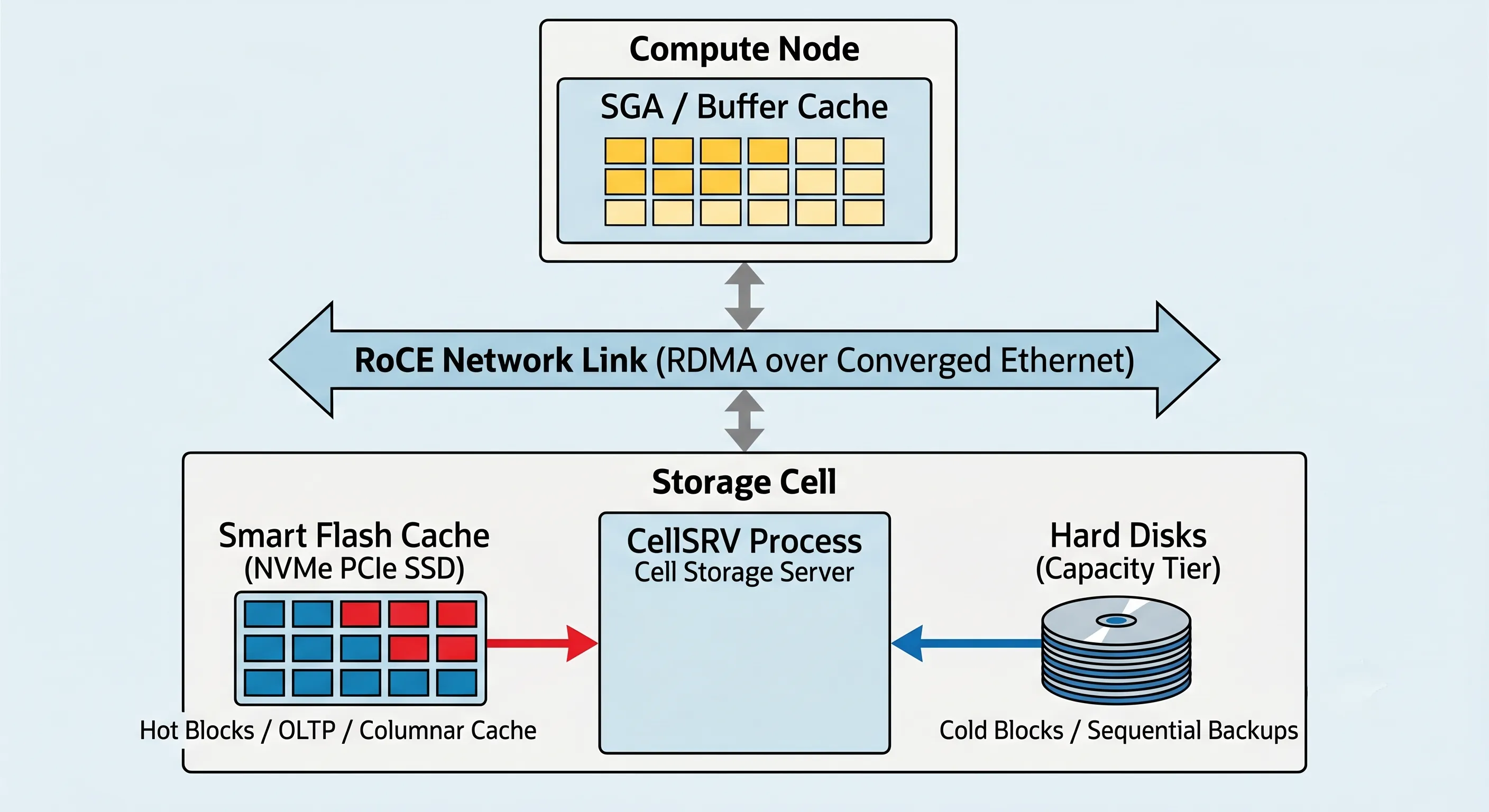
Figure 1 · Oracle Exadata Smart Flash Cache Architecture
Architectural Components
Exadata Storage Cells contain both high-capacity mechanical disks (in High Capacity configurations) and high-performance NVMe PCIe Flash drives. The software controlling these assets is CellSRV (Cell Server) — a process that understands Oracle database block formats, object types, and transaction states, unlike a generic storage array cache that operates blindly at the logical block address (LBA) level.
Intelligent Caching Mechanisms
Smart Flash Cache accelerates performance through three distinct behaviors:
| Mechanism | Behavior | Impact |
|---|---|---|
| Read Optimization | CellSRV checks Flash first; hits return via RDMA over Converged Ethernet (RoCE), bypassing physical disk reads | Microsecond read latency for hot data |
| Automatic Cache Management | Distinguishes "hot" data (index blocks, control files) from "cold" data (historical logs, archive tables) | No manual tier assignment required |
| Data-Aware Prioritization | Large sequential reads (backups, Data Pump exports) are recognized and prevented from evicting critical transaction data | OLTP cache survives batch windows |
05 · How Does Smart Flash Cache Decide What Belongs in Flash?
Manual cache tuning — assigning specific tables to distinct storage tiers — is notoriously error-prone and difficult to maintain as application workloads evolve. Every I/O request sent from an Exadata Database Server to a Storage Cell carries additional information that informs the storage layer about the nature of the block being requested.
Automatic Cache Eviction
The eviction algorithm does not merely use a Least Recently Used (LRU) policy. It balances access frequency with block type. An index block not accessed for an hour may still remain in cache over a data block accessed 10 minutes ago during a random batch job. This database-guided allocation prevents performance degradation during shift transitions between daytime OLTP workloads and nighttime batch processing.
06 · What Is Smart Flash Logging and Why Is It Different?
While Smart Flash Cache accelerates read operations, database write performance is frequently constrained by synchronous log writing. In an Oracle database, a transaction cannot complete until the Log Writer process (LGWR) confirms that the redo log entry has been written to persistent storage. This event manifests as the log file sync wait event.
The Commit Performance Bottleneck
When hundreds of users commit transactions simultaneously, LGWR issues synchronous write requests to the storage layer. If a storage device experiences a temporary latency spike — due to internal garbage collection, write serialization, or drive wear — the entire database suffers an elevated log file sync delay.
The Smart Flash Logging Solution
This is where Smart Flash Logging steps in. Instead of forcing LGWR to play roulette with a single storage device's background garbage collection spikes, Exadata forks the write path at the storage cell level.
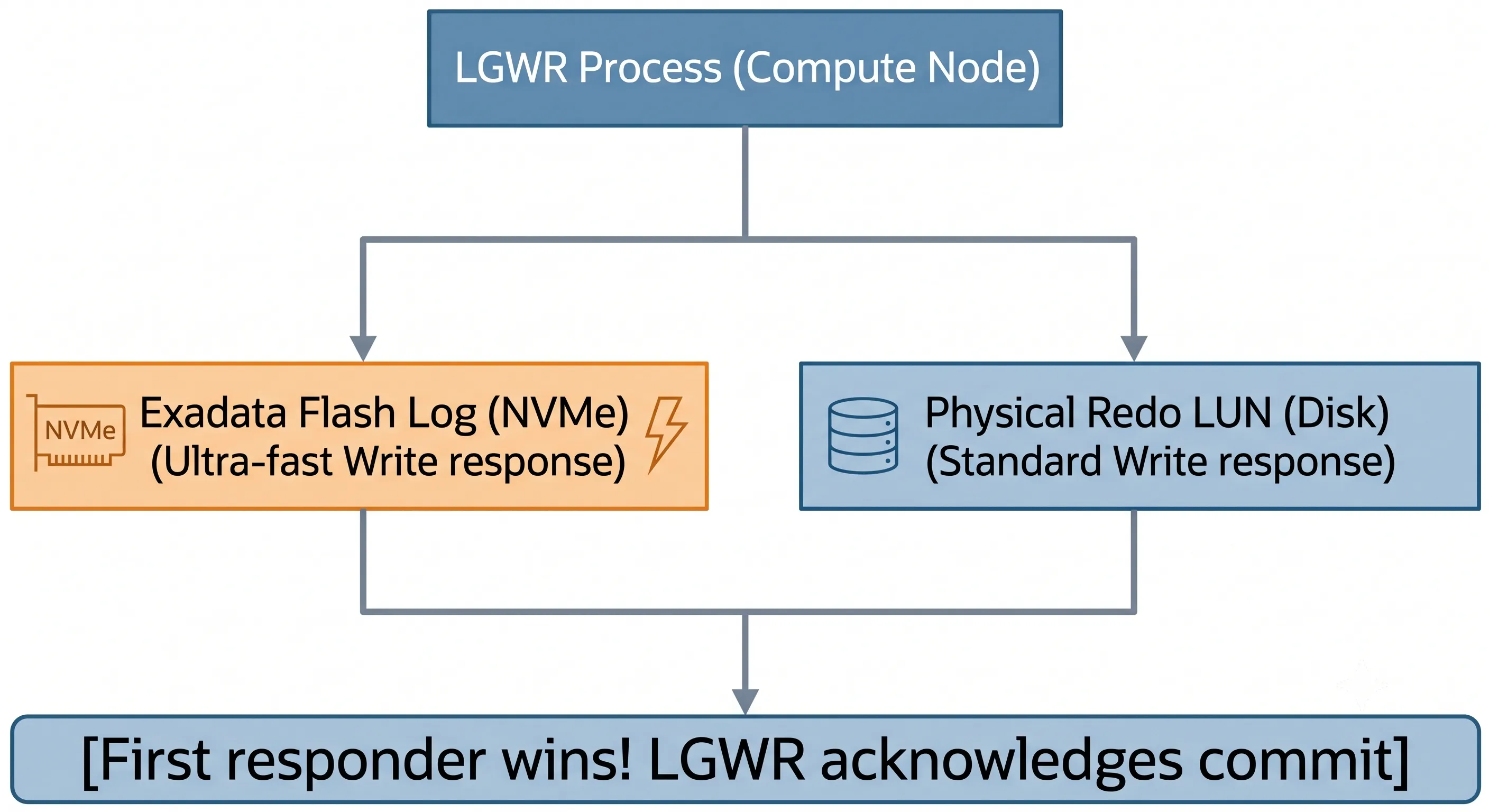
Figure 2 · Smart Flash Logging — Parallel Write Path
- LGWR issues a write requestA batch of redo entries is sent to the Exadata Storage Cell.
- Parallel write to Flash and diskThe cell simultaneously directs the write to both NVMe Flash Log space and physical mechanical disks/grid disks.
- First completion winsWhichever media completes the write first returns a success status back to the compute node.
- Background synchronizationThe storage cell handles cleanup and background sync silently, ensuring data integrity without forcing the database instance to wait.
Because the NVMe memory layer is significantly faster than spinning media, the write usually completes there first — allowing the database to acknowledge the transaction commit immediately. This parallel architecture removes latency spikes from the write path, stabilizing transaction throughput even during peak application utilization.
07 · What Is the Difference Between Write Back and Write Through Modes?
Exadata allows administrators to configure how data blocks (not redo logs) are written to the Smart Flash Cache. This behavior is governed by the caching mode: Write Through or Write Back.
| Property | Write Through Mode | Write Back Mode |
|---|---|---|
| Data Flow | DBWR flushes dirty blocks directly to hard disks; block may be copied into Flash for future reads | DBWR writes dirty blocks directly into Smart Flash Cache; cell acknowledges immediately; destaging to disk occurs asynchronously |
| Write Latency | Limited by underlying physical disk tier performance | Drops from milliseconds to microseconds |
| Write IOPS | Constrained by disk tier | Significantly increased — Flash acts as a non-volatile write buffer |
| Data Safety | Data on disk before acknowledgment | Un-destaged blocks mirrored across multiple storage cells via ASM |
| Recommendation | Read-heavy or compliance-sensitive environments | Recommended default for all modern Exadata deployments |
For all modern Exadata deployments, Write Back mode is the recommended default. Oracle Exadata ensures data safety by maintaining a backup copy of un-destaged blocks across multiple storage cells. If an individual storage cell fails unexpectedly, its mirrored counterpart fulfills the recovery requirements instantly.
08 · How Does Smart Flash Cache Work Together with Smart Scan?
A common misconception is that Smart Scan and Smart Flash Cache compete for the same resources. They do not. Smart Scan passes query execution logic — row filtering and column projection — from database compute nodes directly to the storage cells. When a Smart Scan request arrives, CellSRV coordinates with the Smart Flash Cache using this workflow:
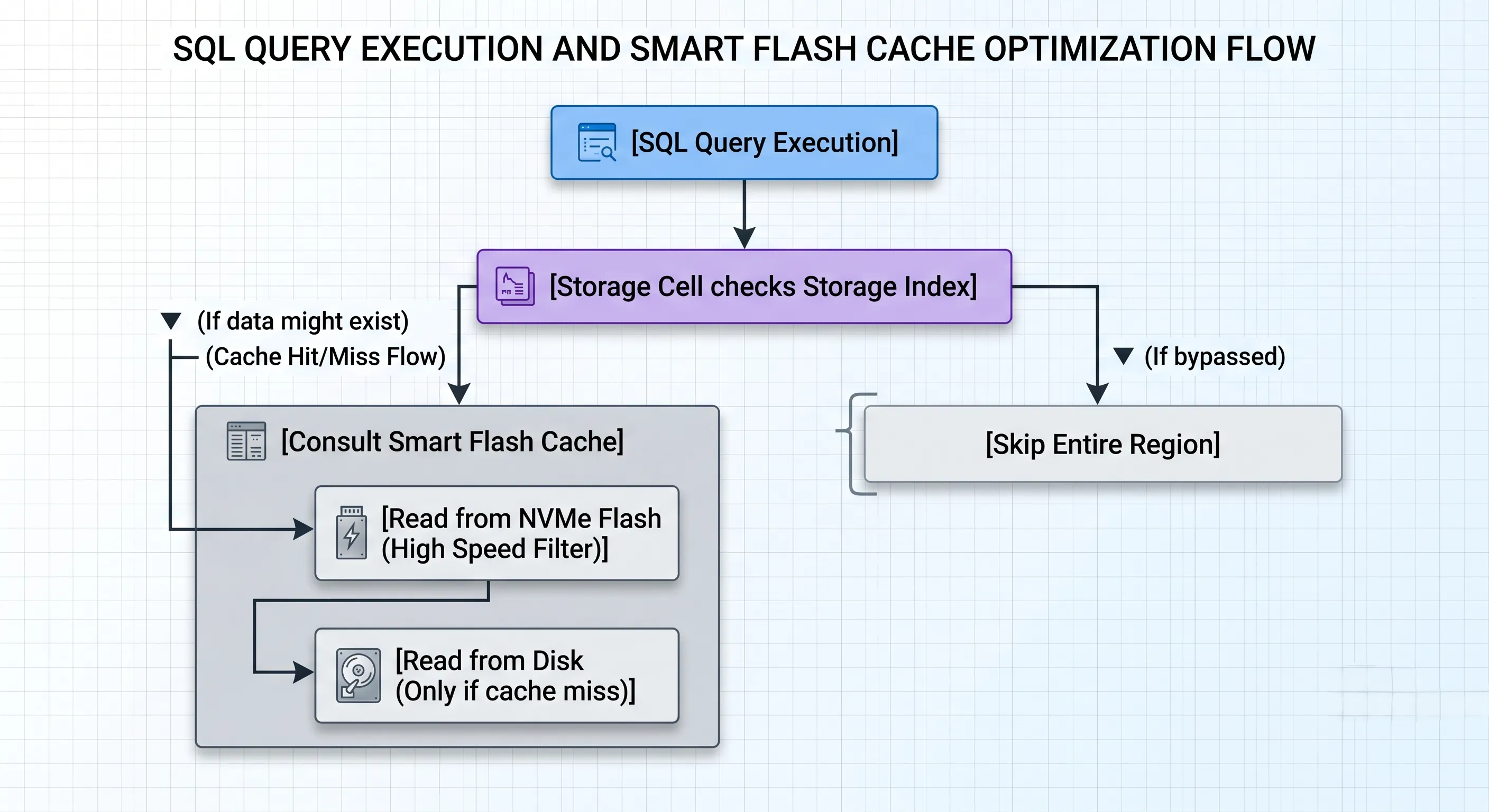
Figure 3 · Smart Scan + Smart Flash Cache Coordination
- Storage Index InspectionBefore reading any data from physical media, CellSRV checks the in-memory Storage Index. If requested values fall outside the min/max range of local data regions, the entire region is skipped.
- Flash Cache QueryingIf the data region cannot be skipped, CellSRV checks whether the required blocks reside within the Smart Flash Cache.
- Flash Cache OffloadingIf blocks are present in Flash, Smart Scan filters the data while reading it directly out of high-speed NVMe flash memory.
Why They Complement Each Other
Instead of choosing between high-speed caching (OLTP) and offloaded scanning (Data Warehousing), Exadata unifies them. The Smart Flash Cache features a dedicated partition known as the Exadata Smart Flash Columnar Cache. When a large sequential scan accesses data blocks stored in standard row formats, CellSRV can automatically transform those blocks into an optimized columnar format within the Flash cache. Subsequent analytical queries scan this hybridized cache at memory speeds — avoiding disk access and format conversion overhead simultaneously.
09 · Which Workloads Benefit the Most from Smart Flash Cache?
Because Exadata adapts its caching strategies dynamically, it delivers targeted benefits across disparate architectural workloads:
1. Online Transaction Processing (OLTP)
OLTP systems rely on fast random lookups, rapid index traversals, and frequent single-row insertions. Smart Flash Cache stores the upper layers of B-Tree indexes persistently, keeping index execution paths highly responsive. Combined with Smart Flash Logging, log file sync waits are mitigated, allowing for higher transaction concurrency.
2. Data Warehousing & Business Intelligence (DW/BI)
Analytical queries typically extract insights from large historical datasets via full table scans. Through Columnar Caching and integration with Smart Scan, analytical workloads stream filtered datasets out of flash memory without overwhelming the compute node CPUs or saturating the storage fabric.
3. Consolidated Databases / Pluggable Databases (PDBs)
In modern multi-tenant environments, distinct workloads share physical infrastructure. Exadata utilizes I/O Resource Management (IORM) to allocate Smart Flash Cache resources programmatically across distinct PDBs — preventing a non-critical development environment from evicting the active cache structures of a production instance.
10 · Common Myths About Database Flash Storage
| Myth | Reality |
|---|---|
| SSDs automatically solve every database problem | Standard SSDs only lower physical device latency. Poorly designed queries still pull millions of unneeded blocks across the storage network. |
| Flash Cache must store the entire database to be effective | Due to the Pareto Principle (80/20 rule), a minor fraction of data is actively queried at any given time. Smart Flash Cache identifies these active regions automatically. |
| Smart Flash Cache replaces the Database Buffer Cache (RAM) | SGA operates at nanosecond speeds with complex memory mutations. Smart Flash Cache operates at microsecond speeds as a broader secondary tier. They work in tandem. |
| Smart Flash Logging is only useful for recovery | Smart Flash Logging is an active runtime optimization tool designed to stabilize transaction processing and reduce day-to-day log file sync delays. |
| Write Back mode compromises data safety | Write Back mode mirrors unwritten blocks across distinct physical storage cells. The architecture protects against both individual drive failures and complete cell outages. |
11 · Production Best Practices for DBAs and Infrastructure Engineers
1. Monitor Flash Cache Efficiency via AWR
Do not guess whether your flash cache is performing as expected. Analyze AWR reports during peak hours and look for this metric:
+ cell physical IO bytes eligible for predicate offload
cell flash cache read hits
cell physical IO bytes eligible for predicate offload
If you observe high cell physical read IO requests accompanied by low flash cache hit metrics, investigate whether a massive batch processing job is pushing critical working data sets out of memory prematurely.
2. Verify Write Back Status Across All Storage Cells
Ensure Write Back caching is universally active across your cell matrix:
Run this from a storage cell administration console to confirm Write Back is enabled on every cell in the rack.
$ cellcli -e "LIST CELL DETAIL" | grep -i cacheMode
cacheMode: WriteBack
3. Implement Advanced Storage Visualizations with ExaWatcher
Use the integrated ExaWatcher utility to track long-term performance trends across the storage layer. Review the Iostat and Cellsrv collection metrics to ensure that individual NVMe flash modules are not demonstrating anomalous queue lengths or asymmetric utilization percentages.
4. Rely on IORM for Multi-Tenant Resource Control
Avoid manual tuning parameters like CELL_FLASH_CACHE KEEP unless dealing with strict application performance guarantees. Instead, leverage Inter-Database and Intra-Database I/O Resource Management (IORM) plans:
Allocate Smart Flash Cache quotas across databases — production gets guaranteed minimum capacity; development is capped to prevent cache eviction of critical workloads.
$ cellcli -e "ALTER IORMPLAN DETAIL dbplan=(
    (name='PROD_DB', share=8, flashCacheMin=50),
    (name='DEV_DB',  share=1, flashCacheLimit=10)
)"
- share = 8
- flashCacheMin = 50
- share = 1
- flashCacheLimit = 10
12 · Frequently Asked Questions
Q1: Can I manually pin a table into the Exadata Smart Flash Cache?
Yes. Use the storage clause parameter CELL_FLASH_CACHE KEEP during table definition or via an ALTER TABLE statement. However, this overrides the built-in management algorithms and should be used selectively for critical application tables.
Q2: How does Exadata handle flash drive wear and tear over time?
Exadata storage software actively monitors the write amplification factor and remaining lifespan metrics of all internal NVMe flash modules. If a drive approaches its wear threshold, proactive warnings are dispatched via automated notification mechanisms, allowing for zero-downtime maintenance replacement.
Q3: What happens to the data in Write Back mode if an entire Storage Cell loses power?
Because Exadata distributes mirrored copies of unwritten blocks across independent storage cells via Automatic Storage Management (ASM), another cell immediately services any outstanding read or write requests for those blocks, preventing data loss or downtime.
Q4: Does Smart Flash Cache speed up database backups?
No. Standard database backups generally bypass the Smart Flash Cache to avoid purging your critical operational data sets. Backups read directly from the capacity tier to protect your active transactional cache.
Q5: Is there any scenario where Write Through mode is preferred over Write Back?
Write Through mode is occasionally used in highly specialized environments where the database workload is entirely read-heavy, or where administrative standards require immediate synchronization with physical disk media.
Q6: How does Exadata Columnar Flash Cache differ from Oracle Database In-Memory?
Oracle Database In-Memory stores data in a columnar format directly within the database server's RAM (SGA), optimizing processing speeds for analytical queries. Exadata Columnar Flash Cache provides a secondary, persistent tier of columnar data stored within the NVMe flash layer of the storage cells, bridging the gap between database RAM and raw storage media.
Q7: Does encryption lower the efficiency of the Smart Flash Cache?
No. Exadata architecture offloads cryptographic operations to hardware-accelerated decryption chips inside the storage processors. Encrypted blocks are cached and processed securely without degrading the hit efficiency of the Smart Flash Cache.
13 · The Short Version — 8 Things Every DBA Should Know
- SSDs alone don't eliminate every Oracle database performance bottleneck.Faster media does not reduce data volume or fix architectural I/O patterns.
- Smart Flash Cache intelligently caches frequently accessed data.It does not treat all data equally — block type and access patterns drive placement.
- CellSRV automatically determines what stays in Flash.No manual tier assignment required for normal operation.
- Smart Flash Logging accelerates transaction commits.Critical redo information is written to Flash in parallel with disk — first completion wins.
- Write Back mode delivers higher write performance safely.Un-destaged blocks are mirrored across storage cells via ASM.
- Smart Flash Cache works with Smart Scan and Storage Indexes.They are complementary, not competing, acceleration mechanisms.
- Different workloads benefit differently.OLTP and mixed workloads often see the greatest performance improvements.
- Exadata's advantage is intelligent storage management.Not simply faster SSD hardware — engineering a smarter database platform.
14 · Conclusion
Flash storage makes disks faster. Exadata makes the storage layer smarter.
That is the difference between buying faster hardware and engineering a faster database platform. Smart Flash Cache, Smart Flash Logging, and Smart Scan work together as a unified acceleration stack — one that adapts to your workload without manual tuning.
Storage latency is only one component of end-to-end database performance. Data volume reduction, intelligent caching, and offloaded processing are what separate Exadata from an all-flash array with a faster waiting room.
Master Exadata Flash Architecture with ExaGuru
Our Exadata Expert course covers Smart Flash Cache, Smart Flash Logging, Write Back/Write Through modes, Smart Scan, and real-world AWR diagnostics — the skills that turn storage wait events into architecture decisions.
- Hands-on labs with flash cache hit ratio analysis and IORM configuration
- Exadata Cloud Service (ExaCS) and Exadata Cloud@Customer (ExaCC) deployment patterns
- Enterprise performance benchmarking and cellcli administration