01 · Introduction
Imagine pressing Enter on a SQL query. What happens during the next two seconds inside an Oracle Exadata rack?
To a casual observer, it's just another query hitting a prompt. You execute code, and data comes back. But under the hood of an Exadata rack, a massive, silent choreography unfolds in a matter of milliseconds. Compute Nodes parse the SQL, Storage Cells process data, Smart Scan pushes filtering to storage, and RoCE moves data across the network with ultra-low latency.
The performance isn't magic — it's the result of an Oracle Exadata architecture specifically engineered to minimize unnecessary data movement. Let's follow a SQL query through the full SQL query execution life cycle — from the moment it's submitted until the results appear on your screen.
Compute Nodes parse SQL, validate security, and generate the execution plan via the Optimizer.
Storage Cells run Exadata Cell Offloading and Exadata Smart Scan at the disk tier.
RoCE delivers filtered results via zero-copy RDMA — no traditional SAN fabric bottleneck.
02 · Which Server Receives the SQL Query First?
The query always lands on a Compute Node (Database Server) first. No exceptions — this is the entry point for every client session in the rack.
Hitting the Listener:
Your client application connects to the Oracle Listener running on the Compute Node. The Listener is the front door — it accepts the connection and routes it to the correct database instance.
Spawning the Server Process:
The Listener passes the session to a dedicated server process within the Database Instance. From this point, your SQL lives inside Oracle's process space on the compute tier.
Generating the Execution Plan via Optimizer:
The Compute Node handles the initial heavy lifting: checking syntax, validating security privileges, and consulting the Optimizer to generate the ideal execution plan. Nothing touches storage until this plan is locked in.
03 · What Happens Inside the Compute Node Before Any Data Is Read?
Before touching storage, the Compute Node checks if it can avoid I/O operations altogether. On Exadata running Oracle RAC, that means two things happen in parallel.
Memory Check
Because Exadata runs Oracle RAC, the node checks its local Buffer Cache and uses Cache Fusion to check neighboring Compute Nodes. If the blocks are already hot in memory, the query never leaves the compute tier.
This Is Where Traditional Setups Choke
On standard hardware, missing the memory cache means forcing your storage network to drag millions of raw 8KB blocks across a saturated SAN fabric — wasting massive overhead just to throw away 99% of the data during filtering.
The Exadata Shift
Instead of fetching the blocks, the Compute Node packages the query's WHERE clauses and required columns into a metadata bundle, leveraging Oracle's proprietary iDB (Intelligent Database) protocol mapped over Remote Direct Memory Access (RDMA) mappings, and prepares to offload the work to Storage Cells.
The iDB protocol is the handshake that tells Storage Cells what to filter — not a request to ship raw blocks upstream for the database to filter later.
04 · When Do Storage Cells Take Over?
Storage Cells take control the moment the Compute Node realizes it needs to scan large amounts of data.
The Map
The database asks Automatic Storage Management (ASM) for an extent map to find exactly which Grid Disks and Storage Cells hold the data.
The Command
The Compute Node fires the iDB request across the high-speed network to the targeted cells.
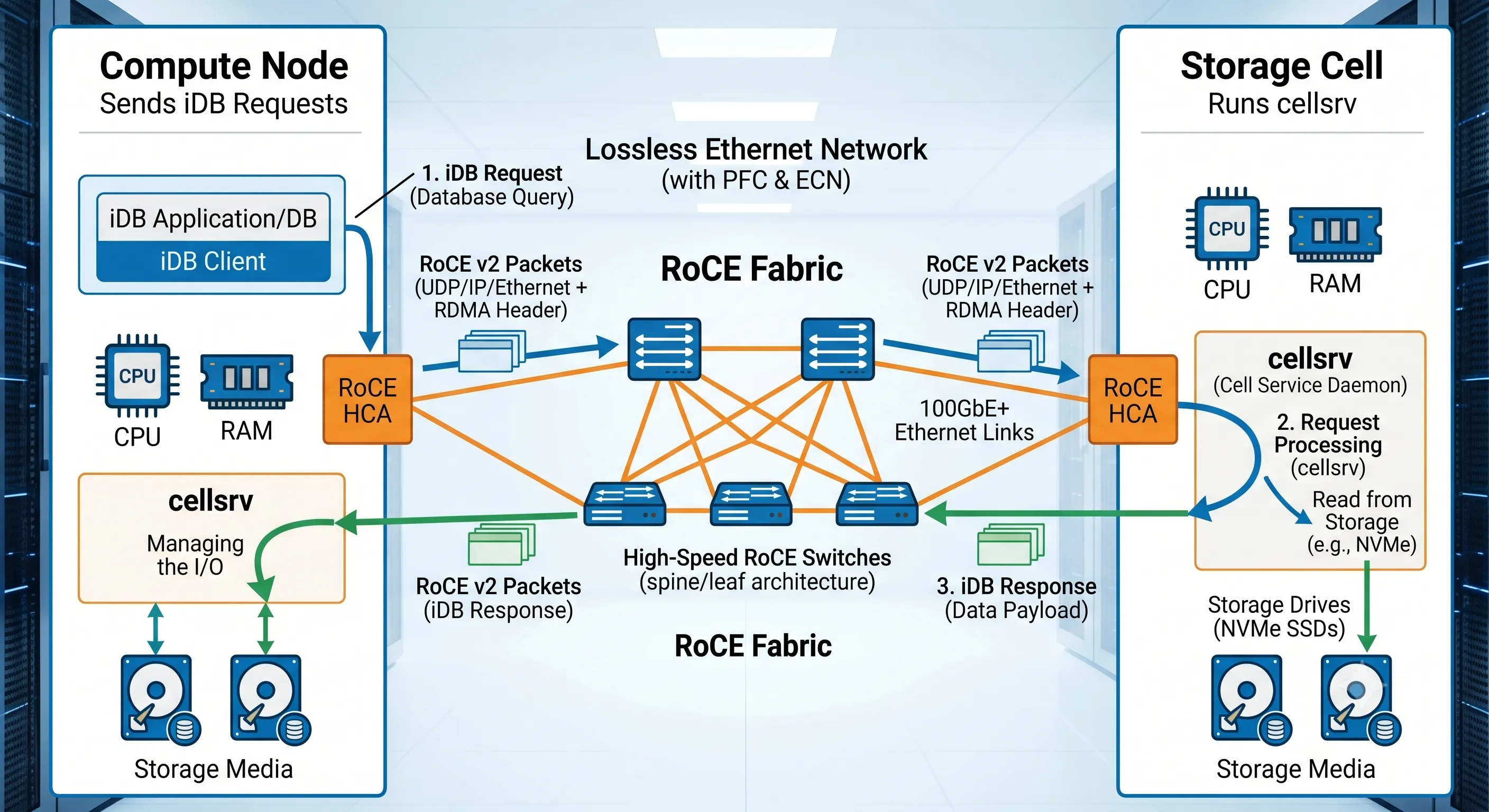
Figure 1 · Exadata Cell Offloading — Compute Node to Storage Cell architecture
The Cell Server (cellsrv) software handles the request using the storage cell's own dedicated CPU and memory, leaving the Compute Node's resources completely free for join, sort, and aggregation work.
05 · When Is Smart Scan Activated — and Why Doesn't Every Query Use It?
Exadata Smart Scan is Exadata's premier feature, but it only activates during a Full Table Scan (FTS) or an Index Fast Full Scan using Direct Path I/O — bypassing the shared buffer cache straight into the user's PGA.
Oracle Exadata Smart Scan activates exclusively during Full Table Scans (FTS) or Index Fast Full Scans when Direct Path I/O is utilized. If a query pulls data via specific primary key index lookups (OLTP), Smart Scan is bypassed to prioritize sub-millisecond single-block retrievals.
The Smart Scan Mechanical Process
Instead of sending raw data layers up to the database tier, the Storage Cell processes the data internally:
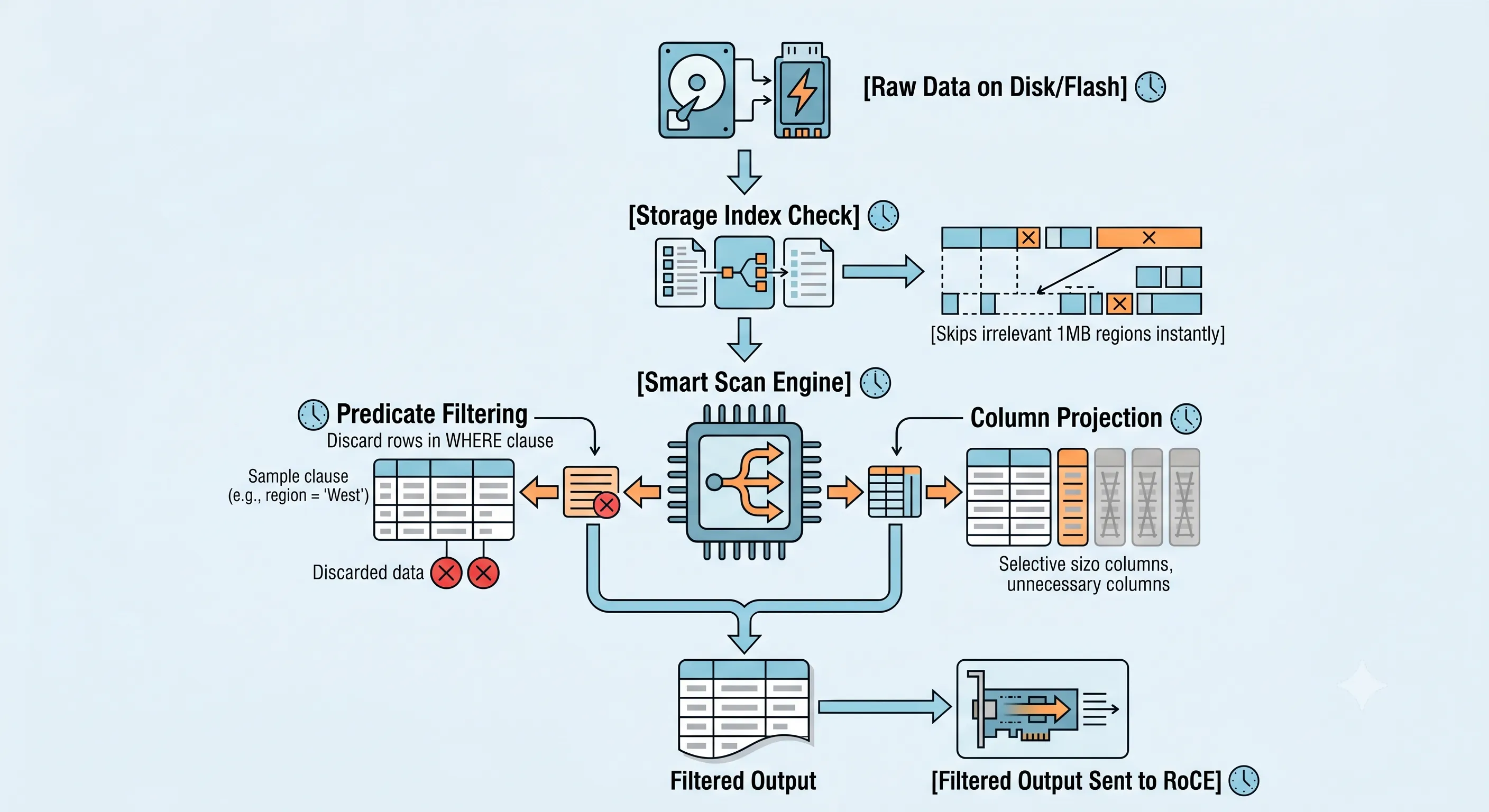
Figure 2 · How Exadata Smart Scan filters rows and columns at the storage tier
Why Not Every Query Uses It
| Query Type | Access Path | Smart Scan? | Why |
|---|---|---|---|
| High-throughput OLTP | Index Unique Scan | No | Pulling a single row by primary key (e.g. WHERE ID = 105) — a straightforward Index Unique Scan handles this faster by picking out that precise 8KB block directly. |
| Small dimension tables | Buffer Cache read | No | If a table easily fits into the Compute Node's buffer cache, the database reads it from local RAM instead of engaging the storage cells. |
| Large analytical scan | Full Table Scan + Direct Path I/O | Yes | Smart Scan filters rows and columns at the cell — only matching data crosses the network. |
| Index Fast Full Scan | Direct Path I/O | Yes | Eligible when Direct Path reads bypass the shared buffer cache into PGA. |
06 · How Does RoCE Move Data Faster Than Traditional Networking?
Once the Storage Cell isolates the matching data, it transmits it using RoCE (RDMA over Converged Ethernet) — a fundamental departure from traditional SAN fabric transport.
RoCE vs Traditional SAN Fabric
| Characteristic | Traditional SAN Fabric | Exadata RoCE (RDMA) |
|---|---|---|
| Data path | Block → HBA → switch → OS network stack → database | Cell → RDMA → directly into PGA memory |
| CPU overhead | High — full network stack processing | Near zero — zero-copy networking |
| Latency | Milliseconds on congested fabric | Microseconds — ultra-low latency |
| Data volume moved | All raw blocks upstream | Pre-filtered result sets only |
Using Zero-Copy Networking, the storage hardware writes the filtered query results directly into the user's memory space (PGA) on the Compute Node, requiring zero network-stack processing. That's why a filtered 10GB table scan might ship only 200MB across the wire.
07 · How Are the Results Returned to the User?
With the heavy filtering completed at the storage layer, the final steps on the Compute Node are comparatively lightweight.
- AssemblyThe Compute Node grabs the pre-filtered data chunks already sitting in PGA memory — no re-read from disk required.
- Final PolishIf the query requires a cross-table JOIN, custom sorting (ORDER BY), or complex analytical window functions, the Compute Node CPU executes them here. Smart Scan did the brute-force filtering; the compute tier handles relational algebra.
- DeliveryThe final, condensed result set is sent back to the client application via standard SQL*Net packets.
08 · Quick Diagnostic Reference
DBAs can track whether queries are leveraging this workflow using standard dynamic performance views. This is essential Oracle DBA Exadata tuning work — confirm offloading before you start rewriting SQL.
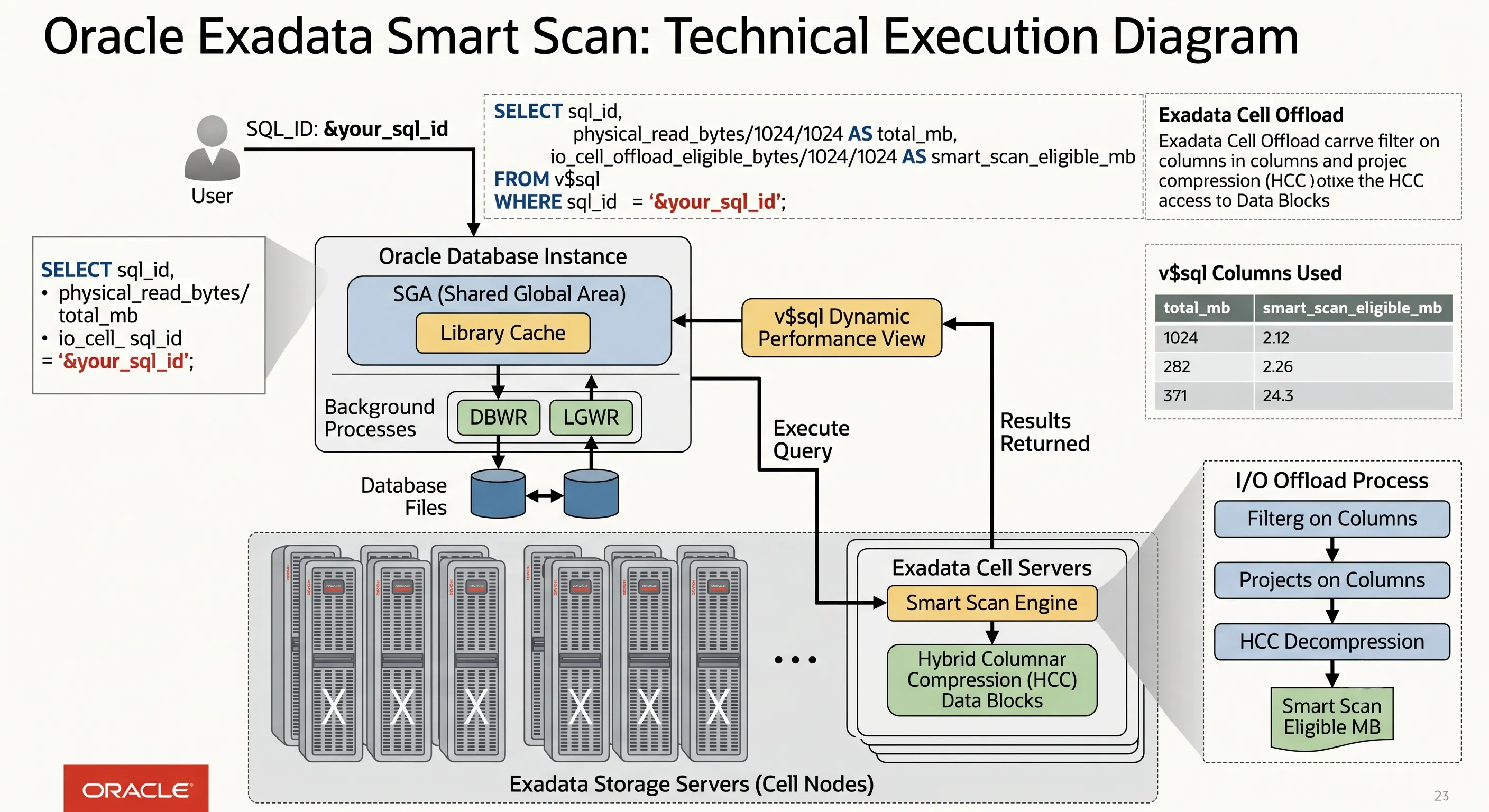
Figure 3 · Diagnostic queries for Exadata Cell Offloading and Smart Scan eligibility
- If
smart_scan_eligible_mbmatchestotal_mb, your query is running optimally via Cell Offloading. - Monitor the
cell smart table scanwait event inV$SESSION_WAITto confirm active storage-tier scanning. - Check
V$SQLoffload columns (io_cell_offload_eligible_bytes,io_cell_offload_returned_bytes) to quantify how much data Smart Scan eliminated from the network path.
A query can show a Full Table Scan in the plan and still fail to offload if Direct Path I/O isn't active or if a function on an indexed column prevents predicate pushdown. Always verify offloading in the views — not just the execution plan display.
09 · Frequently Asked Questions
1. Can a query use both an Index and a Smart Scan simultaneously on the same table?
No. A single scan operation on a table segment uses either an index lookup path or a full scan path. Smart Scan is only triggered during full scans that utilize direct path I/O.
2. Do Storage Indexes persist if a Storage Cell restarts?
No. Storage Indexes are purely in-memory structures maintained by the cellsrv process within the storage cell's RAM. They automatically rebuild as new data blocks are read.
3. How do I force a query to use Smart Scan if it isn't doing so automatically?
Ensure that the Optimizer chooses a full table scan using the /*+ FULL(table_name) */ hint and ensure that direct path reads are active by allowing parallel execution /*+ PARALLEL(table_name) */. Then verify offloading in V$SQL — hints alone don't guarantee cell offload.
4. What happens to Smart Scan if a Storage Cell fails mid-query?
ASM instantly reroutes the I/O requests for the missing data extents to the mirror copies located on the remaining functional Storage Cells. The query continues executing seamlessly.
10 · The Short Version — 8 Steps Behind Every SQL Query
- The Entry PointThe SQL query first reaches a Compute Node, where Oracle parses it and creates an execution plan.
- Optimizer DecisionThe Optimizer determines whether features like Smart Scan and Cell Offloading can be used.
- Intelligent HandoffStorage requests are sent to the appropriate Storage Cells instead of reading everything through the database server.
- Smart Scan ExecutionSmart Scan filters rows and columns directly inside the Storage Cells, dramatically reducing unnecessary I/O.
- Data SkippingStorage Indexes help skip disk regions that cannot contain matching data, avoiding wasted reads.
- Ultra-Low Latency TransportRoCE transports the filtered data between Storage Cells and Compute Nodes with ultra-low latency using RDMA.
- Final ConsolidationThe Compute Node assembles the final result set and returns only the requested data to the client.
- The Core PhilosophyThe biggest performance gain comes from moving SQL processing closer to the data instead of moving all the data to the database server.
11 · Conclusion
A SQL query in a traditional Oracle server spends most of its life moving data. In Oracle Exadata, it spends most of its time avoiding unnecessary data movement. That's the architectural difference that makes Exadata one of the fastest database platforms in the world.
Move processing to the data — not data to the server. That's the Exadata principle every DBA should internalize.
Whether you're troubleshooting a slow full scan or designing a new workload for Exadata Cloud Service, understanding this lifecycle — Compute Node → iDB → cellsrv → Smart Scan → RoCE → PGA — is what separates a generic DBA from someone who can actually exploit the platform.
Want to go deeper?
ExaGuru's Exadata Expert course covers Smart Scan diagnostics, Cell Offloading tuning, ExaCC/ExaCS architecture, and hands-on AWR analysis — the skills that turn this article into production-grade expertise.
Explore Exadata Expert Course