01 · Why Network Connection Timeouts Mask DNS Failures in Cloud Infrastructure
A DNS failure in cloud infrastructure is a resolution problem, not a routing problem — yet it produces the same symptoms engineers associate with a severed network path. When an application fails to connect to a database, engineers instinctively check the plumbing:
- Security Lists & Network Security Groups (NSGs)
- Route Tables & Gateways
- FastConnect or VPN status
If the pipes are open but connection timeouts persist, running nslookup often reveals the true culprit: the hostname isn't resolving. Because a DNS failure prevents a TCP/IP connection from starting, it perfectly masquerades as a severed network path — the client never reaches the stage where packets would prove connectivity.
Before opening a network ticket, ask: Can the hostname resolve? If ping <IP> works but nslookup <hostname> fails, the problem lives in DNS — not in Security Lists, route tables, or VPN tunnels.
02 · The Step-by-Step OCI DNS Lookup Chain Sequence
The OCI DNS lookup chain does follow a strict five-tier hierarchy whenever a compute instance inside a Virtual Cloud Network (VCN) requests resolution for a private hostname such as db.internal.company.com. If any link breaks, the whole chain fails — the query drops or returns an immediate NXDOMAIN error.
- Local Operating System Cache: The OS checks local files (
/etc/hostsor Windows local DNS cache) and local caching daemons (likesystemd-resolved). - Kubernetes Cluster DNS (If Applicable): In Oracle Container Engine for Kubernetes (OKE) environments, the request hits the internal cluster CoreDNS service first to check for internal service names.
- VCN Resolver (Fallback IP): Unresolved queries are routed directly to the internal OCI system identifier address:
169.254.169.254. - Private DNS Resolver Views: The VCN resolver looks up attached private zones inside the designated Resolver View for matching records.
- External Forwarders / Public Root Servers: If no private match is found, the query targets configured outbound endpoints for on-premises routing or reaches out to public internet root name servers.
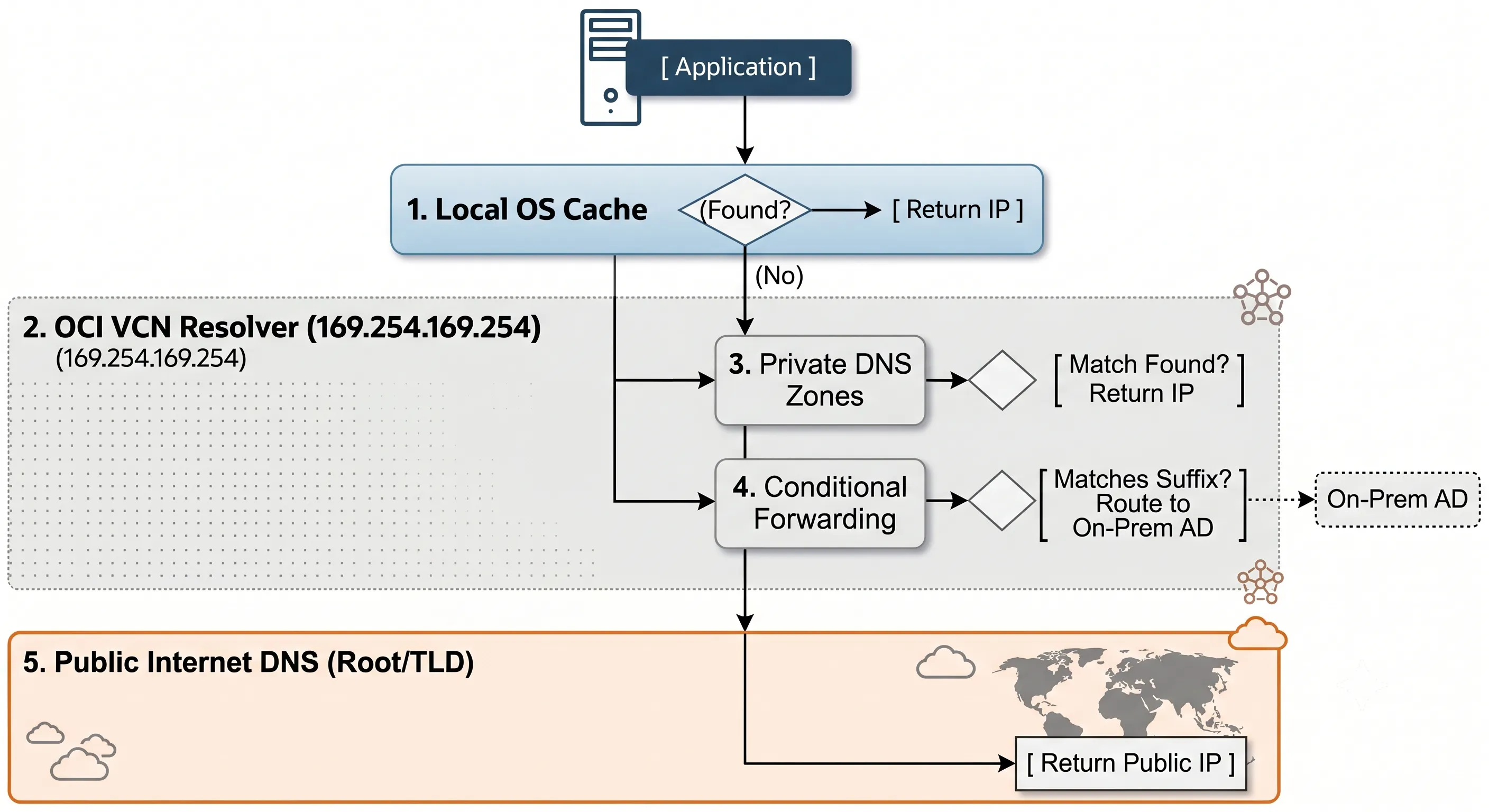
Figure 1 · OCI DNS lookup chain — from instance to resolver to zone
03 · Core Architectural Components of Oracle Cloud DNS
Oracle Cloud DNS does provide a managed resolver for every VCN automatically, delivered via DHCP. This VCN Resolver directs internal queries to the fallback IP 169.254.169.254 — the same metadata-service address pattern used across OCI for instance-level services. The resolver model is conceptually similar to AWS Route 53 Resolver Rules or Azure DNS Private Resolver, but is native to the OCI VCN boundary.
| Component | Scope | Primary Use Case |
|---|---|---|
| Public DNS | Internet-wide | Hosting public endpoints, websites, and external APIs |
| Private DNS | VCN / Tenant | Securing internal microservices, databases, and load balancers |
| Resolver View | Resolver Level | Groups private zones; controls namespace visibility per VCN |
| Endpoints | VCN Boundary | Inbound: Listens for on-prem queries. Outbound: Forwards queries to on-prem. |
Table 1 · OCI DNS core components and their scope
04 · Configuring OCI Private DNS Zones and Custom Domains
OCI Private DNS does create default internal names ending in .oraclevcn.com for every VCN. For enterprise governance, you should use Custom Private DNS Zones (e.g., oci.company.com) that align with your corporate naming standards.
Essential Record Types
| Record Type | Purpose in OCI |
|---|---|
| A / AAAA | Maps hostname directly to an IPv4/IPv6 address |
| CNAME | Aliases a friendly name to a complex OCI string (like an Autonomous DB endpoint) |
| SRV / PTR | Used for Active Directory service discovery and reverse lookups |
Pro Tip: Split-Horizon DNS
Split-horizon DNS in cloud architecture is a method that serves distinct DNS responses to internal and external networks using a single namespace domain. You can use the exact same domain name (e.g., app.company.com) for public and private traffic. External users hit the Public DNS (resolving to a WAF/Public Load Balancer), while internal OCI instances query the Private Resolver View (resolving directly to a private backend IP), keeping internal traffic completely off the internet.
05 · Hybrid Cloud DNS Architecture and Conditional Forwarding
Hybrid cloud DNS does require bidirectional resolution across OCI, on-premises data centers, and other clouds. Enterprise environments need seamless name resolution without forcing every query through the public internet.
Setting up a hybrid architecture requires establishing point-to-point network paths (via FastConnect or IPSec VPN) followed by configuring OCI interface endpoints. Rather than allowing your entire private network space to intermingle blindly, OCI segments bidirectional traffic using distinct virtual interfaces:
- Inbound Endpoints: Act as an internal listener inside your VCN with a dedicated private IP. They receive incoming queries from your on-premises domain controllers or DNS appliances and map them to OCI private views.
- Outbound Endpoints: Act as an egress interface. When an instance inside OCI asks for an on-premises record, the VCN resolver forwards that query out through this interface toward your corporate data center DNS server.
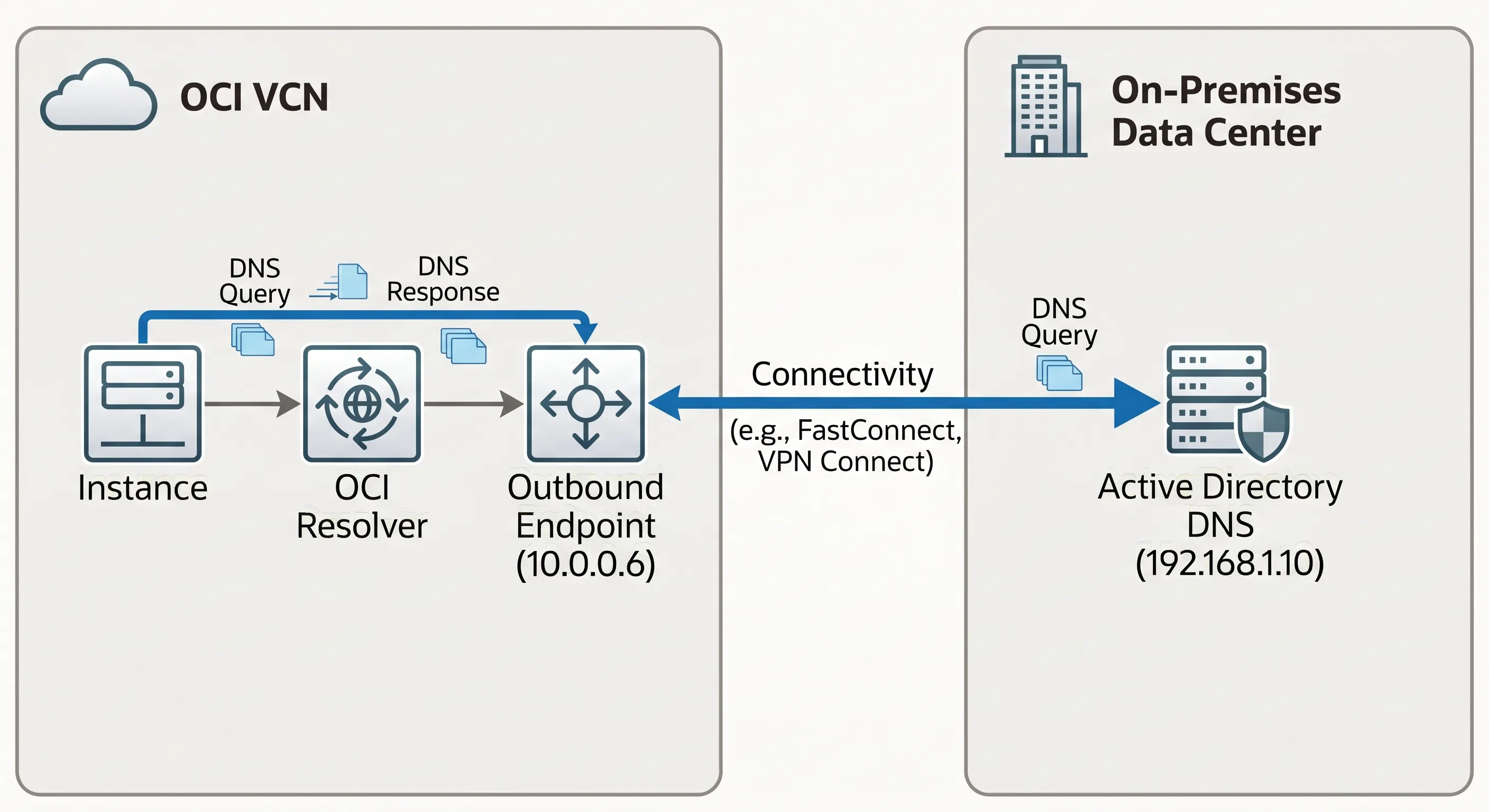
Figure 2 · Hybrid DNS — bidirectional forwarding between OCI and on-premises
Bidirectional Configuration Example
To configure bidirectional resolution between OCI (oci.company.com) and on-premises (company.local):
"If query ends in company.local, forward to 192.168.1.10 via Outbound Endpoint 10.0.0.6."
Target OCI's Inbound Endpoint (10.0.0.5) for any queries ending in oci.company.com.
06 · Common OCI DNS Failure Scenarios, Symptoms, and Fixes
These four scenarios account for the majority of production DNS incidents in OCI hybrid and Kubernetes environments. Each follows the same pattern: network connectivity appears healthy, but name resolution fails at a specific tier of the lookup chain.
Scenario 1: The "Broken" VPN/FastConnect Link
Symptom Can ping the on-prem DB IP (192.168.1.50), but the application fails using db.company.local.
Root Cause The network link is fine; the OCI Resolver simply doesn't know where to send .company.local queries.
Fix Add an Outbound Endpoint and a forwarding rule pointing to the on-prem DNS servers.
Scenario 2: Kubernetes Pod Connection Failures
Symptom OKE pods can't resolve the cloud database, but standard OCI VMs can.
Root Cause Misconfigured CoreDNS ConfigMap inside Kubernetes.
Fix Edit the CoreDNS ConfigMap (kubectl edit cm coredns -n kube-system) and ensure upstream forwarding points to 169.254.169.254.
Scenario 3: Ghost Changes (The Caching Trap)
Symptom You updated a Private DNS record from 10.0.1.5 to 10.0.1.90, but the app still hits the old IP.
Root Cause Client-side OS or application-level caching (common in Java apps).
Fix Flush the OS cache (sudo resolvectl flush-caches) or restart the app process.
Scenario 4: Intermittent Large Query Failures
Symptom Small DNS requests work; large queries or zone transfers fail.
Root Cause Security Lists or NSGs allowed UDP Port 53 but blocked TCP Port 53. Queries over 512 bytes automatically fall back to TCP.
Fix Open both UDP and TCP Port 53 in your security rules.
07 · Step-by-Step OCI DNS Diagnostics and CLI Workflow
OCI DNS diagnostics do follow a layered isolation approach — decouple network paths from configuration errors before touching resolver rules or zone records. Use this quick isolation matrix when triage urgency strikes. Run these terminal commands directly from the affected instance:
- Isolate the Layer: Attempt to ping the destination IP directly. If the IP responds but the hostname times out, proceed down the DNS stack.
- Query the Local Loopback: Run
dig <hostname>to see which server is responding as the primary authority. - Bypass the OS and Hit the Fabric: Force a direct lookup to the OCI system resolver metadata IP using
dig @169.254.169.254 <hostname>to see if the cloud infrastructure holds the correct record. - Test Payload Size and Ports: Force TCP transport via
dig +tcp @169.254.169.254 <hostname>to check if security rules are dropping packets exceeding standard UDP limits.
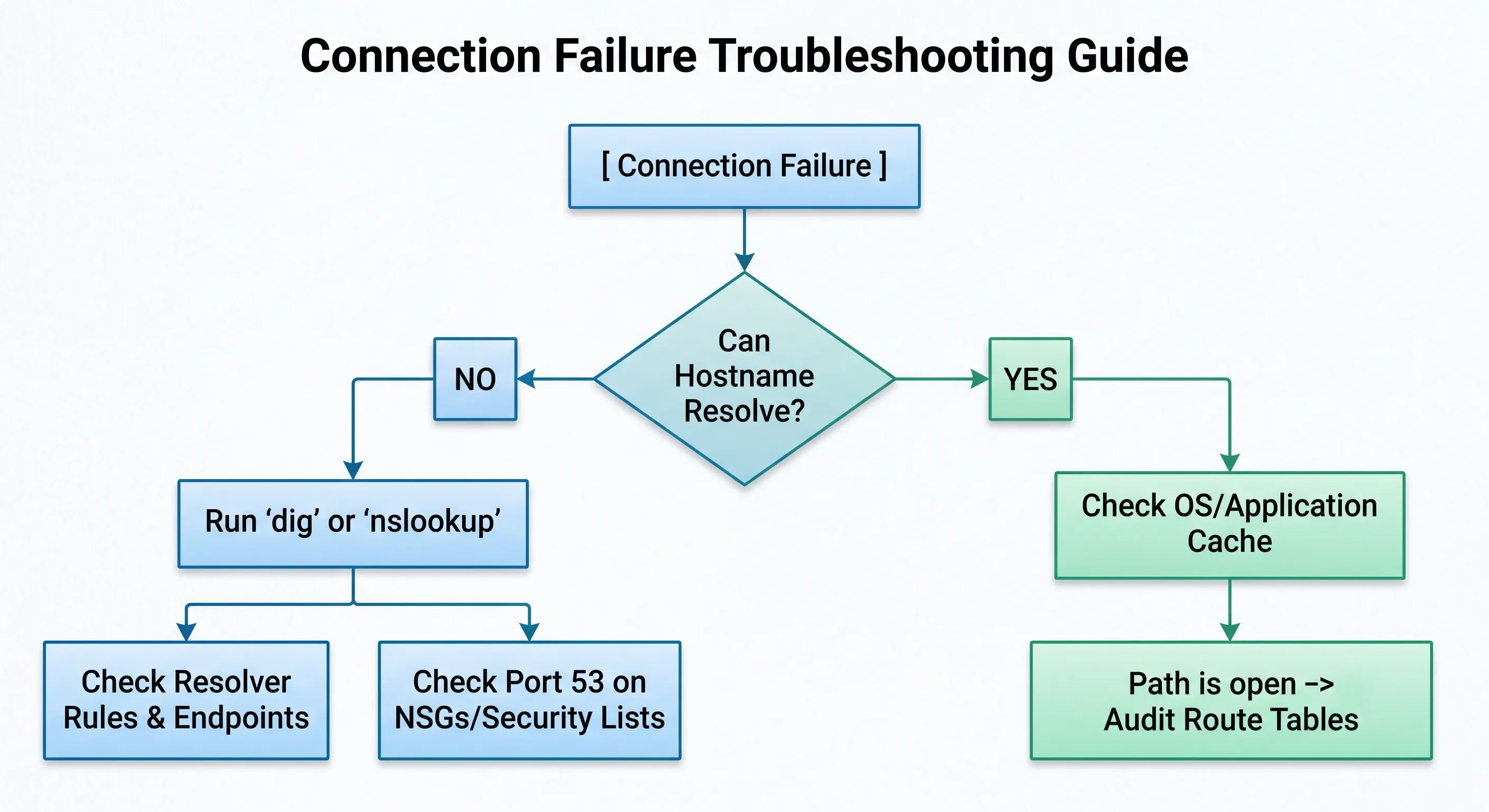
Figure 3 · Fast OCI DNS troubleshooting workflow
Key CLI Commands
08 · Summary Checklist
Before closing any "network is down" incident, run through this checklist:
- Never hardcode IP addresses; use Private DNS Zones.IPs change in cloud environments. DNS records with appropriate TTLs survive infrastructure churn.
- Keep TTLs low (60–300s) for dynamic cloud resources.Short TTLs speed up failovers when instances are replaced or load balancer backends shift.
- Consolidate architectures using a Hub-and-Spoke VCN DNS model.Prefer a central resolver hub over point-to-point forwarding meshes that become unmaintainable.
- Open both UDP and TCP Port 53.Large responses and zone transfers require TCP. Blocking it causes intermittent failures that are hard to reproduce.
- Verify OKE CoreDNS upstream points to 169.254.169.254.Pods inherit cluster DNS config — a misconfigured ConfigMap breaks resolution for every workload.
Next time someone says "the network is down," make your first question: Can the hostname resolve?